
Standard vs Square Business Cards: Which Shape Suits Your Brand?
Oct 03, 2026
The more distinctive business card isn’t automatically the more effective one. When weighing standard vs square business cards, consider what you need the card to do after you hand it over.
A square card can make a design stand out through its shape, but it also needs to present your contact details clearly and suit the way people handle and store business cards. Standard cards have familiar rectangular proportions. Square cards offer a different canvas, so the layout needs to be designed for that shape.
This guide compares the practical trade-offs, including layout, readability and everyday use. It also covers what to check in your artwork before printing, from the finished dimensions to spacing around the trim. Use those checks to choose a format that suits your brand, audience and intended use, rather than choosing novelty alone.
Key Takeaways
- Choose between standard vs square business cards based on how recipients will handle and store them, not novelty alone.
- Compare both shapes using the same content brief, then prioritise your name, role and essential contact details.
- Before printing, check the finished size, layout, file suitability and final proof.
- Prepare your quantity, single- or double-sided choice, material or finish, deadline and artwork for your print order.
- Same-day business card printing is available for selected quantities and specifications through Printbox London (Same Day Printing London).
Standard vs square business cards: what changes when you change the shape?
Standard business cards have a familiar rectangular outline. Square cards create a different visual impression before someone reads the details. Neither shape guarantees a particular response. The decision is about how you want the card to look and work in someone’s hand.
Here’s the practical difference at a glance:
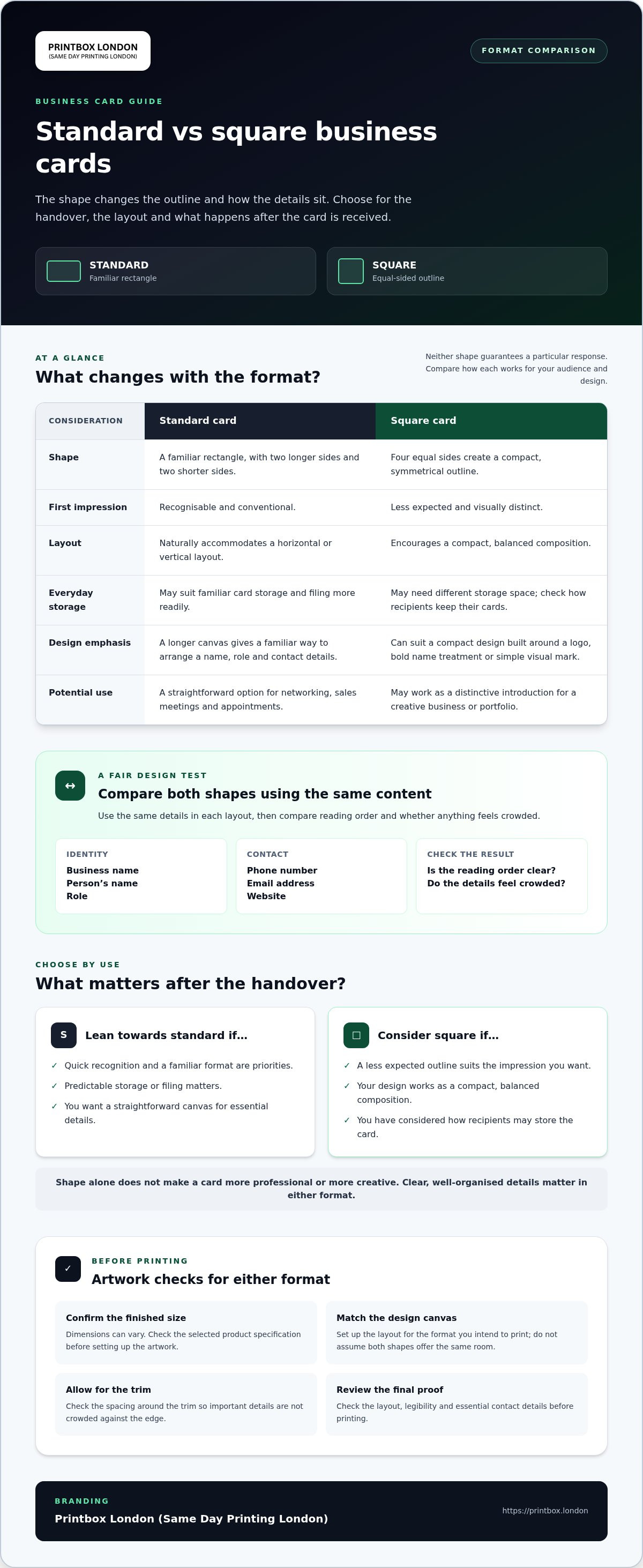
| Consideration | Standard card | Square card |
|---|---|---|
| Shape | Familiar rectangle | Equal-sided outline |
| Impression | Recognisable and conventional | Less expected and visually distinct |
| Layout flexibility | Works naturally with a horizontal or vertical layout | Encourages a compact, balanced composition |
| Everyday handling | May suit familiar card storage better | May need different storage space |
What do standard and square business cards look like?
A standard card has two longer sides and two shorter sides, giving names and contact details a familiar landscape or portrait frame. A square card has four equal sides, so its outline feels more compact and symmetrical. That change can influence the first impression, but the design still does the work: a clear, well-organised card matters more than novelty alone.
Finished dimensions can vary, so check the selected product specification before setting up your artwork. The design canvas should match the format you intend to print.
What can shape change, and what does it not decide?
Shape affects the outline and how content sits on the card. It does not determine the paper, colour, finishing or design style. Those are separate choices. A square format is not automatically more creative, just as a rectangular one is not automatically more professional. A restrained square design can feel formal; a bold rectangular design can feel expressive.
The format difference is simple: standard feels familiar, while square changes the outline.
For a fair design test, use the same details in both layouts: name, role, business name and essential contact information. Compare the reading order and see whether the details feel crowded. For background on business cards and their history, see standard business card sizes.
Once you’ve chosen a shape, consider paper and finishing separately. Explore business-card options on the business card printing page. You can also find information about passport photos in London and American passport, visa and ID photos in London.
How standard and square business cards work in everyday use
Think about the handover and what happens afterwards. At a meeting, networking event or client appointment, both formats are easy to pass across, but they may fit differently into the recipient’s routine. A familiar rectangle can be easier to recognise and file alongside other cards. A square card has a less expected outline, which may suit a distinctive creative introduction, but it can sit differently in a wallet or card holder.
Storage habits vary. Some people keep cards loose in a wallet; others use a dedicated holder, desk organiser or filing system. Don’t assume every compartment will suit every format. If recipients are likely to keep your details for later, consider how they might store the card. Also think about how you’ll carry your own supply to appointments or events.
When does the familiar rectangular format make sense?
A standard rectangular card is a practical choice when you want quick recognition and a format people are used to receiving. It can work for networking, sales meetings and appointments where the immediate aim is to make your name and contact details easy to find. Its longer canvas also gives you a natural way to arrange information, such as placing your name and role prominently, then grouping phone, email and website details beneath or alongside them.
Choose this shape if predictable storage matters to you, or if you hand out cards to a broad mix of people and want the format to feel straightforward. The shape itself does not make a card more professional. Clear content and legible type still matter.
When might a square format suit the job?
Square proportions can suit a compact design built around a logo, a bold name treatment or a simple visual mark. For a designer or illustrator, the card could act as a small portfolio introduction. For an appointment-based creative business, it could provide a distinctive reminder. These are design possibilities, not a promise of stronger results.
The shape can also affect how you distribute and store cards. Before choosing it, consider whether clients or event contacts are likely to use standard holders, file the cards or simply tuck them into a pocket. If easy filing is important, the familiar rectangle may be the more straightforward option.
When comparing standard vs square business cards, base the decision on the handover and what follows it: who receives the card, what they need to remember, and where they’re likely to put it. If you’re ready to discuss an order, contact Printbox London (Same Day Printing London) with your chosen format and intended use.
Which business-card shape gives your design enough room?
Use the same content brief to compare both formats. For example, include the business name, person’s name, role, phone number, email address and website. The shape changes how those details fit together, but the usable space depends on the finished dimensions and your layout. Check the selected product specification before designing; don’t assume both formats offer the same room.
Keep the card focused. It should make essential details easy to find, not carry every service, social account and piece of company information. If you’re trying to fit too much, remove secondary details or direct people to a website rather than shrinking the text until it’s difficult to read.
How should you organise content on a standard card?
Give the information a clear order: make the person’s name and role prominent, then group the key contact details together. A rectangular layout can guide the eye across the card, but too many separate elements can make it feel crowded. Use alignment and open space to distinguish the main details from supporting ones.
If the design feels cramped, edit the content first. Keep the essential phone, email or website details, and move less important information elsewhere. Reducing the text size should not be your first fix.
How should you adapt a layout for a square card?
Start a fresh layout rather than stretching a rectangular design into a square. A layout built for a wide shape can leave awkward gaps or push text too close to the edges. Reposition the logo, name and contact details so they feel balanced within the new proportions.
Whitespace is useful when it gives important details room to stand out. Check that the logo remains clear, the text has a natural reading order and the design feels balanced on both sides if you’re using double-sided printing. You do not need to fill every available area.
For a fair standard vs square business cards comparison, sketch both versions with identical wording, then check readability at the intended finished size. If you’re considering the square format, see the square business card page for format-specific information. Keep your final choice tied to the artwork and product dimensions, not a template designed for another shape.
Artwork checks before printing standard or square business cards
Before sending either format to print, check that the artwork is built for the exact card you’ve chosen. A file can look balanced on screen but still place details too close to the edge or crop a logo unexpectedly. Work through this pre-flight sequence:
- 1. Confirm the shape. Make sure the artwork is designed for a rectangular or square card, not simply adapted from the other format.
- 2. Check the finished size. Set the document canvas to the selected product’s specified dimensions. Don’t estimate from an old template.
- 3. Review the layout. Keep the name, role and key contact details clear, with important content away from the trim edge.
- 4. Check the file. A correctly prepared print-ready PDF is generally suitable, but its suitability depends on the artwork. Check that fonts display correctly, images are clear and colours follow the print requirements.
- 5. Inspect the final proof. Review both sides if the card is double-sided, paying attention to alignment, spelling and anything close to the edges.
What should you check in the artwork file?
Check raster images, such as photographs, at their final printed size. A resolution of 300 dpi is a useful target for crisp business-card images, but it cannot compensate for a poor-quality source image or one enlarged too far. Where the print specification calls for CMYK, prepare the artwork in CMYK rather than relying on an RGB screen preview to predict the printed colour.
It helps to understand the edge terms. The trim is where the card is cut to its finished size. A safe area is the space inside that edge where essential text and logos should remain. Bleed is extra artwork extending beyond the trim, helping prevent a thin unprinted edge if the cut shifts slightly. A 3 mm bleed is common, but requirements vary, so follow the selected product’s specification.
How can you avoid a square design being cropped incorrectly?
Start with a square-format template or canvas set to the correct dimensions. Don’t crop a rectangular design and assume the result will stay balanced. Check all four sides for consistent spacing, confirm that background colours or images extend into any required bleed, and keep logos and text clear of the trim. Follow the print specification for the chosen card, since artwork and bleed requirements can differ by product.
For format-specific guidance, see the square business-card printing page.
Choose a format, then arrange business-card printing in London
Make your choice based on four practical points: what recipients expect, how the shape fits your brand, whether your key details sit clearly in the layout, and how you or your clients will store the cards. A familiar rectangle can suit a straightforward introduction; a square may better match a design-led identity. The right option works for the people receiving it as well as for the design.
Once you’ve settled on a format, get the order details together. This helps keep the print specification and artwork aligned:
- Chosen shape and finished size
- Quantity required
- Single- or double-sided printing
- Material or finish preference
- Required deadline
- Final artwork, prepared for the selected card size
What information should you have ready for a print order?
Use the finished size from the chosen product specification when preparing your artwork. If you’re unsure whether the file is ready to print, provide it with your order details so it can be considered alongside the card format and specification. For an urgent order, see the same-day business-card printing page. Same-day printing is available for selected quantities and specifications.
How can London customers move from comparison to print?
Printbox London (Same Day Printing London) prints business cards for customers throughout Greater London, including Central, North, East, South and West London. Customers in Haringey, Hackney, Islington, Camden, Enfield, Barnet, Westminster, Newham, Redbridge and Waltham Forest can also use the service. The physical shop is at 52 West Green Road, South Tottenham, London N15 5NR. Collection is available once your order is confirmed ready.
Same-day printing is available for selected quantities and specifications. Turnaround depends on the order, including its specification, artwork readiness, stock and production workload. Provide your required deadline when arranging the job rather than assuming a particular turnaround.
Before placing the order, check that the shape and finished size in your artwork match the specification, and that the final proof shows the correct details on every side. A clear brief makes it easier to move from comparing standard vs square business cards to a print-ready choice.
Ready to discuss your chosen format? Contact Printbox London (Same Day Printing London) with the size, quantity, deadline and artwork.
Make your choice and get your cards ready to print
The right format is the one that fits your audience, brand and everyday use. A standard card offers a familiar outline; a square card gives your design a different shape. For either option, keep the name and essential contact details easy to read, and prepare artwork for the correct finished size rather than adapting a file without checking it.
That’s the practical answer to standard vs square business cards: decide how recipients will handle the card, then make sure the layout supports that choice. Printbox London (Same Day Printing London) prints business cards, including square business cards. Same-day business-card printing is available for selected quantities and specifications, with collection from the Tottenham shop once your order is confirmed ready.
Have your chosen format, quantity, deadline and artwork ready to discuss. Contact Printbox London (Same Day Printing London) to arrange your business-card printing.
Choose the shape that suits your brand, check the artwork carefully, and you’ll be ready to put your details into people’s hands.
Frequently Asked Questions
What is the difference between standard and square business cards?
The practical difference in standard vs square business cards is their outline: a standard card is rectangular, while a square card has equal sides. This affects the card’s visual impression and how its content fits, but neither shape is universally better. A rectangle offers familiar proportions for arranging details; a square needs a layout designed for its balanced shape. Choose based on your brand, information and intended use.
Are square business cards practical to carry?
Square business cards can be practical to carry, but consider where you and your recipients keep cards. A square outline may fit differently from a rectangle in wallets, card holders or filing systems, and compatibility varies. If clients are likely to store your card for future reference, think about their habits. If you carry cards to meetings or events, check that your own holder suits the selected format.
What size is a standard business card in the UK?
Check the current product specification for the exact finished size before preparing your artwork. The finished size is the card’s dimensions after trimming; the artwork canvas may need to be larger if bleed is required. Don’t confuse the two when setting up a file. Once you’ve confirmed the finished dimensions, build the document to the supplied print requirements and keep important text and logos safely inside the trim area.
Can I use the same design for standard and square business cards?
You can reuse the same branding and information, but the layout usually needs rebuilding. A rectangular design may look stretched or unbalanced if simply cropped into a square. Create a separate layout for each format, reposition the logo and contact details, and check spacing around every edge. Compare both at their intended finished sizes to make sure the essential information remains clear and the design feels balanced.
Which business-card shape is better for a creative business?
Neither shape is automatically better for a creative business. Choose a standard rectangle if it suits your visual identity, audience and storage needs. A square may fit a compact, symmetrical design or a more distinctive brand style. In both cases, make your name and essential contact details easy to find. Consider where you’ll hand out the cards and how recipients are likely to keep them.
What should I check before sending business-card artwork to print?
Confirm the selected shape and finished size, then check the layout, text, fonts and image quality. Keep important details within the safe area and add bleed where the product specification requires it. Raster images should be suitable at final print size; 300 dpi is a useful target. Check the colour mode against the print requirements, then review a final proof for alignment, spelling and cropping before approving the file.
Can I get square business cards printed the same day in London?
Same-day square business-card printing is available for selected quantities and specifications through Printbox London (Same Day Printing London). Turnaround depends on the order, including its quantity, specification, artwork readiness, stock and production workload, so don’t assume every job will be ready that day. The shop is in Tottenham, North London, and collection is available once the order is confirmed ready.
Article by
Printbox London Team
The Printbox London (Same Day Printing London) team provides practical printing guidance based on real customer requirements and day-to-day print production. We serve customers across Greater London from our Tottenham print shop, with same-day printing available for many products depending on quantity, specification, artwork and production capacity.