
Professional Flyer Printing: Same-Day London Guide
Sep 02, 2026
You've spent weeks planning your launch, but now you're staring at a delivery tracking screen that hasn't moved in six hours. It's a common London nightmare; an urgent deadline is approaching, and you're still waiting on marketing materials that might arrive late or look pixelated. You need high-quality a5 flyer printing that doesn't rely on the unpredictability of a courier. We understand that when you're working in a fast-paced city, "tomorrow" is often twenty-four hours too late.
You deserve prints that reflect the quality of your brand without the technical headache. We agree that choosing between different paper thicknesses should be simple, and your artwork must come out crisp every single time. This guide will teach you how to master the technical essentials of professional printing, from bleed margins to colour profiles. You'll learn exactly how to prepare print-ready files for same-day collection at our North London shop on West Green Road. We're moving from artwork anxiety to a stress-free process that puts vibrant, professional flyers in your hands today.
Key Takeaways
- Understand why A5 remains the industry standard for London businesses and how physical flyers deliver higher engagement rates than digital marketing.
- Learn how to select the ideal GSM and paper finish to ensure your marketing materials feel professional and build immediate customer trust.
- Master the technical requirements for a5 flyer printing, including 300 DPI resolution and CMYK colour modes, to guarantee crisp and vibrant results.
- Discover how to navigate urgent deadlines using same-day production and local collection in North London to eliminate the risk of courier delays.
- Apply strategic distribution tactics and the '5-second rule' to ensure your message lands effectively with your local target audience.
Fundamentals of Professional Flyer Printing: Why A5 is the Industry Standard
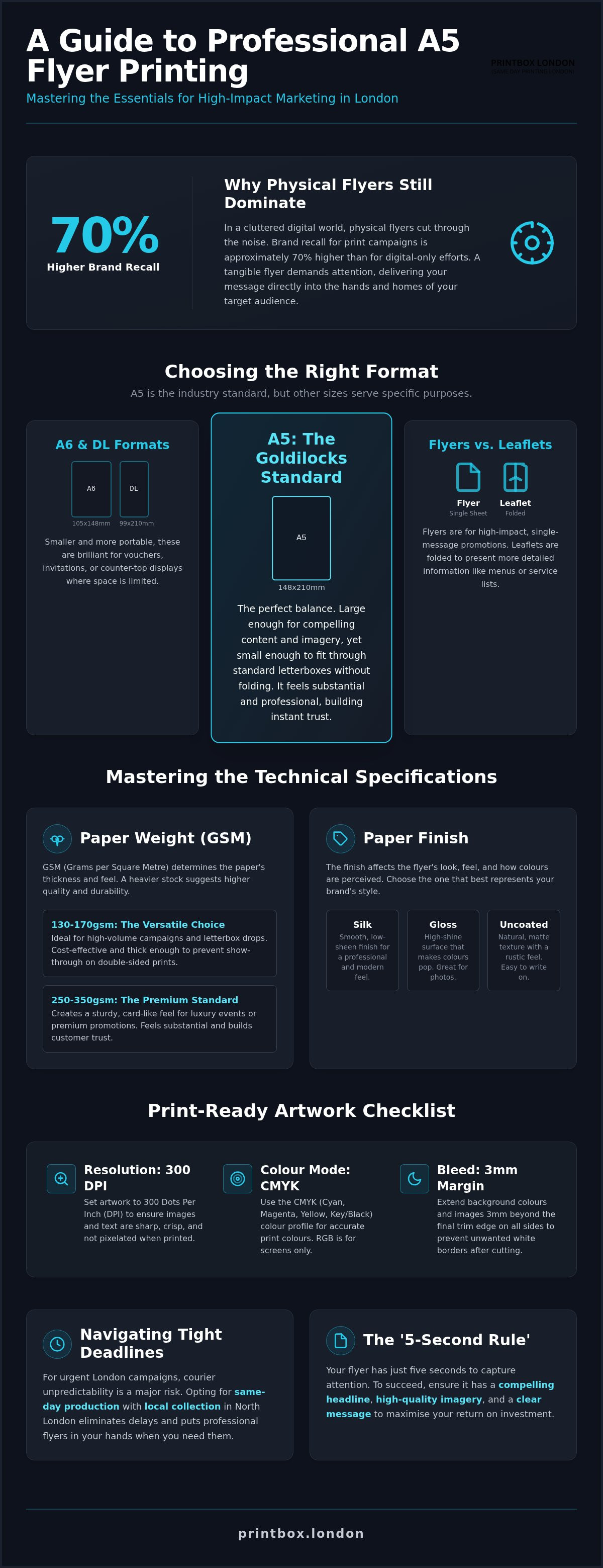
In the high-speed streets of North London, a professional flyer isn't just paper; it's a direct handshake with your customer. What is a Flyer? At its core, it's a single-sheet marketing tool designed for wide distribution. In 2026, physical media is making a massive comeback. Recent data indicates that brand recall is approximately 70% higher for physical flyer campaigns compared to purely digital ones. Whilst social media feeds are cluttered and easily ignored, a physical flyer in a resident's hand demands immediate attention. It bypasses the noise of the digital world to deliver your message directly into homes and businesses.
Selecting a5 flyer printing is the most strategic choice for a reason. At 148 x 210mm, it's the "Goldilocks" format of the printing world. It's large enough to include a compelling headline, high-resolution imagery, and a clear QR code, but small enough to fit through standard UK letterboxes without needing to be folded. It feels substantial in the hand. Unlike smaller formats that can feel like throwaway scraps, the A5 size suggests a level of professional authority that builds instant trust with your audience.
Flyers vs Leaflets: Which One Do You Need?
Structure defines your strategy. A flyer is a single, flat sheet. It's built for speed and high-impact, single-message promotions. If you're launching a new cafe in West Green Road or promoting a one-night event, a flyer is your best tool. Leaflets are different; they're folded to create multiple panels. Choose a leaflet when you need to present detailed price lists, complex service descriptions, or full restaurant menus. The fold invites the reader to explore, whereas the flyer demands they act now. For urgent marketing, the single-sheet flyer is the undisputed king of efficiency.
A5 vs A6 and DL: Choosing the Best Choice for ROI
Maximising your return on investment depends on your distribution method. A5 flyers offer the best ROI for letterbox drops because they provide enough space to overcome the "5-second rule" of consumer attention. A6 and DL formats are smaller and more portable. They work brilliantly as vouchers, invitations, or counter-top displays in local shops where space is at a premium. However, for a comprehensive look at your options, you can read our guide on A5 Flyer Printing London: The Complete Guide to Same-Day Leaflets. For most London campaigns, A5 remains the unbeatable standard for balancing production cost with visual visibility.
Technical Specifications: Paper Weights, Stocks, and Finishes
The weight of your paper speaks before the customer reads a single word. In the printing industry, we measure this using GSM, or Grams per Square Metre. This value represents the density and thickness of the paper stock. Choosing the right weight for your a5 flyer printing is a strategic balance between your marketing budget and the physical impression you want to leave. Research into the effectiveness of physical advertisements suggests that tactile quality directly influences how long a person holds onto a piece of mail. A flimsy flyer might be dismissed as junk; a sturdy card demands a second look.
London's climate also plays a role in your technical choices. High humidity or a sudden North London downpour can ruin unprotected paper. Stocks with a slight coating, such as silk or gloss, provide a basic barrier that helps the flyer maintain its integrity during outdoor distribution. Thinking about these details ensures your message doesn't just reach the doorstep, but actually makes it onto the kitchen table in one piece.
The GSM Guide: From Budget Handouts to Premium Cards
Most high-volume campaigns use 130gsm to 170gsm paper. These stocks are thin enough to keep costs low but thick enough to prevent the "show-through" of double-sided printing. They're the versatile choice for mass letterbox drops. If you're hosting a premium boutique event or printing a high-end menu, move up to 250gsm or 350gsm. This weight creates a card-like feel that suggests luxury and durability. Amongst professional distributors, heavier stocks are often preferred. They're easier to slide through stiff letterboxes without crumpling, ensuring your message arrives in pristine condition.
Silk, Gloss, or Uncoated: Finding Your Favourite Finish
Your choice of finish affects how your flyer handles different lighting conditions. Silk is our most popular option. It offers a smooth, satin-like surface that reduces glare, making it the professional choice for text-heavy designs. Gloss is the opposite; it makes colours pop with a high-shine finish. It's ideal for food photography or vibrant fashion events where visual impact is everything. Uncoated paper is the tactile, "organic" choice. It has a slightly rougher texture and is perfect for vintage designs or flyers that require the customer to write information down. If you're unsure which stock fits your brand, you can consult with our experts at our West Green Road shop for a hands-on recommendation.
How to Prepare Your Artwork for Professional Printing
You don't need expensive design software or a degree in graphic arts to get professional results for your a5 flyer printing. Whilst digital platforms are everywhere, The Case for Print Media demonstrates that physical quality is still a major factor in how customers perceive your brand's reliability. To meet that standard, your digital file must be technically sound before it hits the press. Professional digital equipment is precise, but it can only produce what's in the file. If the file is low-quality, the print will be too.
Resolution is your first priority. Web images are typically 72 DPI, which looks blurry when printed. Ensure every photo and logo is 300 DPI for a crisp, professional finish. Colour space is the next hurdle. Screens use RGB, but our printers use CMYK. If you don't design in CMYK, your colours might look "muddy" or dull once they're on paper. We recommend checking your colour profiles early to avoid surprises when you collect your order from our West Green Road shop.
Step-by-Step Artwork Checklist for Non-Designers
Follow these three steps to ensure your file is ready for our high-speed production engine:
- Check resolution: Zoom into your design to 300%. If the edges of your text or images look jagged or fuzzy, they'll look pixelated on the final flyer.
- Apply 3mm bleed: Bleed is the 3mm safety margin required for trimming. You must extend your background colour or images 3mm beyond the final A5 cut line.
- Convert text to outlines: If you're using professional software, "outline" your fonts. This prevents font substitution errors if our system doesn't have your specific typeface.
How to Export a Print-Ready PDF from Canva or Word
Canva is a brilliant tool for quick promotions, but you must export it correctly. When you're ready, select "Share", then "Download". Choose "PDF Print" as the file type. Crucially, check the box for "Crop marks and bleed". This ensures we know exactly where to cut your flyers. If you're using Microsoft Word, save your document as a "Best for printing" PDF. Avoid using "Rich Black" (a mix of all CMYK colours) for small text or thin lines; stick to 100% Black for the sharpest possible results. Once your PDF is saved, it's the gold standard for reliability and ready for same-day production.
Same-Day Flyer Printing: Navigating Tight Deadlines in London
London moves faster than a courier's GPS can track. Whilst national printing chains boast about 24-hour dispatch, that still leaves your campaign at the mercy of a delivery van stuck in North Circular traffic. We provide a more reliable alternative. Our same-day production process is built for speed, ensuring your a5 flyer printing is completed within hours, not days. This isn't just about fast machines; it's about a streamlined workflow that prioritises urgent local needs. For those moments when an event is tonight and your marketing materials are nowhere to be found, we act as your reliable local fixer.
Timing is everything. To guarantee evening collection at our West Green Road shop, you need to hit the 'Golden Hour'. Most same-day orders in London require files to be submitted by a 3pm cutoff. Meeting this deadline allows our team to flight-check your artwork, run the digital presses, and have your flyers trimmed and packed before you leave the office. If you're facing a crisis, you can find Same Day Printing London: Fast Solutions for Urgent Printing Needs to see how we handle high-pressure requirements.
Digital vs Litho: Why Digital is the King of Speed
Speed requires the right technology. Traditional lithographic printing involves creating physical plates, a process that can take days to set up. Modern digital presses eliminate this wait entirely. They function like high-performance production engines, maintaining perfect colour consistency from the first sheet to the last without any drying time. This makes digital printing the undisputed king for short-run, urgent requirements. If you need fewer than 1,000 flyers, digital is not only faster but significantly more cost-effective. You get professional-grade quality without the litho price tag or the week-long wait.
Planning Your London Collection Logistics
Don't play the 'courier lottery'. Peak London traffic hours can turn a 15-minute delivery into a two-hour delay. Local collection in North London gives you total control over your schedule. When you pick up your order from West Green Road, you gain the immediate peace of mind that comes from checking your flyers on-site. You can verify the colour and paper weight before you head to your event. Our shop is easily accessible for North London businesses and creatives, providing a straightforward solution that bypasses the stress of missed deliveries. You can order your same-day flyers here and pick them up as soon as they're ready.
Maximising ROI: Strategic Distribution and Conversion
You've secured your a5 flyer printing and the quality is undeniable. Now, you need that paper to perform. The "5-second rule" is the most critical factor in physical marketing; most people decide to keep or bin a flyer in the time it takes to walk five paces. Your offer must be unmistakable. Use bold headlines and high-contrast colours to cut through the visual noise of a busy London street. Professional finishing, like the silk or gloss stocks we discussed earlier, makes your brand look trustworthy. Londoners are savvy; they can spot a "home-made" print instantly, and it rarely inspires confidence in a premium service.
Digital integration is non-negotiable for modern campaigns. Use QR codes to bridge the gap between the physical sheet and your digital sales funnel. Statistics from 2026 show that 56% of all purchases prompted by mail are now completed online. Tracking your ROI is simple if you're smart with your design. Include a unique voucher code specific to the flyer batch. This lets you measure exactly how many sales each neighbourhood generated, giving you a clear picture of your marketing spend versus actual revenue.
Effective Distribution Tactics in North London
Location is everything. Target high-footfall areas like local markets, transport hubs, or busy high streets near West Green Road. However, you must stay legal. Many London councils regulate the distribution of free printed matter under the Clean Neighbourhoods and Environment Act 2005. Some areas require a specific license, and penalties for unlicensed distribution can reach £2,500. For letterbox drops, etiquette is vital for your brand's reputation. Ensure your distributors are respectful and avoid homes with "no junk mail" signs. A well-organised campaign in specific neighbourhoods often yields a 5% response rate, significantly outperforming the 1 to 2% typically seen in email marketing.
Design for Conversion: Headlines and CTAs
Your flyer needs a specific job. If it doesn't have a clear "Call to Action" (CTA), it's just a piece of paper. Tell the customer exactly what to do: "Scan to Order", "Bring this for 10% off", or "Visit our North London shop this Saturday". Use punchy, direct language that drives immediate behaviour. When you combine these strategic design choices with the high-quality digital reproduction of our professional presses, you turn a simple handout into a high-performance sales tool. It's about moving the reader from the doorstep to the checkout as quickly as possible.
Launch Your Next London Promotion Today
Successful marketing in a city as fast as London requires both technical precision and immediate availability. By choosing the right paper stock and ensuring your artwork is print-ready with the correct resolution, you eliminate the risk of poor-quality results that damage your brand's reputation. Physical media remains a powerhouse for local ROI; it's the most direct way to reach your neighbours in North London and build immediate trust.
You don't have to wait for couriers or settle for home-office quality. We provide expert same-day production with high-quality digital finishes that suit every business size. Our reliable local collection from our West Green Road shop ensures you meet your event deadlines without the stress. Order your same-day A5 flyers from Printbox London now to get your a5 flyer printing underway immediately. Your next campaign is ready to go; we're here to help you get it into your customers' hands before the day is out.
Frequently Asked Questions
What is the best paper weight for a standard A5 business flyer?
Standard business flyers typically use 130gsm to 170gsm paper. This weight is durable enough for double-sided printing whilst remaining cost-effective for mass distribution across London. If you want a more premium feel for a boutique event, we recommend 250gsm to 350gsm card stock. Heavier weights suggest higher brand quality and are less likely to crumple when pushed through stiff residential letterboxes.
Can I print flyers on the same day in London?
Yes, we provide same-day production for a5 flyer printing at our North London shop. If you submit your print-ready files before our 3pm cutoff, your order will be ready for local collection from West Green Road that evening. This service is ideal for businesses facing tight event deadlines who want to avoid the uncertainty of courier delays or peak-time traffic jams.
What file format do I need to send for professional flyer printing?
A high-resolution PDF is the gold standard for professional results. Your file should be set to CMYK colour mode to ensure accurate reproduction and have a resolution of at least 300 DPI. Using a PDF prevents font substitution errors and ensures that your layout remains exactly as you intended when it reaches our digital presses, preventing any unexpected design shifts.
What is the difference between A5 and A6 flyer sizes?
An A5 flyer measures 148 x 210mm, whilst an A6 flyer is exactly half that size at 105 x 148mm. A5 is the industry standard for letterbox drops because it offers enough space for a clear message and a QR code without being too large. A6 is more portable and works well for vouchers, invitations, or as counter-top handouts in local shops where display space is limited.
Do I need professional design software to prepare my flyer artwork?
You don't need expensive software like Adobe Creative Cloud to design your flyers. Tools like Canva or Microsoft Word are perfectly adequate if you follow the correct export settings. Simply ensure you select the "PDF Print" option and include crop marks and bleed. This allows us to produce high-quality results from your existing designs without any technical complications or software barriers.
What is 'bleed' and why is it important for my flyer design?
Bleed is a 3mm safety margin that extends beyond the final trim line of your flyer. It's essential because industrial cutting machines can vary by a fraction of a millimetre during high-speed production. By extending your background colour or images into this 3mm zone, you ensure your flyers don't have unsightly white edges after they are trimmed to the final A5 size, guaranteeing a professional finish.
Is gloss or silk better for a promotional flyer finish?
Silk is the most popular choice for professional flyers because its satin-like surface makes text easy to read in all lighting conditions. Gloss is better if your design relies heavily on vibrant photography or food images, as the high-shine finish makes colours appear more saturated. Both finishes provide a protective layer that helps your flyers survive outdoor distribution in London's unpredictable climate.
How many flyers should I print for a local London event?
For a local event, your volume depends on your distribution area and footfall. Since residential flyer campaigns typically see a response rate of 1 to 5%, printing 1,000 to 2,500 flyers is a common starting point for a targeted North London neighbourhood drop. Digital printing is highly cost-effective for these smaller runs, allowing you to test your message before committing to larger quantities.