Print Business Cards in London with Custom Finishes
Nov 02, 2026

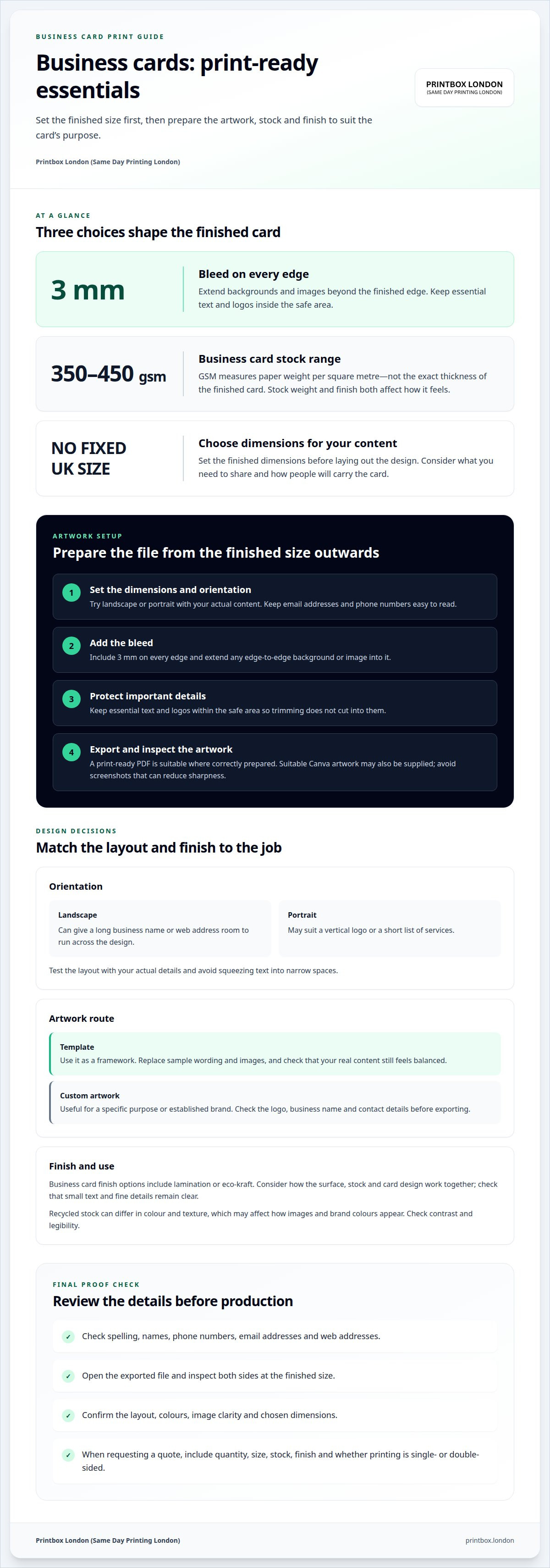
The finished dimensions determine a business card’s size, while its thickness depends on the stock selected. When you print business cards, set the final dimensions before laying out the design, then add 3 mm of bleed on every edge so the artwork extends beyond the trim.
A card can look polished on screen yet lose important details when trimmed. Your choice of finish also affects the final appearance, so plan the design and print requirements together rather than treating artwork as an afterthought.
This guide covers business card sizes, design choices and artwork uploads, along with premium finishes and practical file preparation. You’ll learn what to check in your layout, how bleed and safe margins work, and what to consider when preparing a print-ready file. The aim is simple: help you make clear choices and send artwork that’s ready for production.
Key Takeaways
- Choose a card size and layout that suit the details you need to share and the way you plan to use your cards.
- Prepare your design at the finished size, with clear spacing around essential text and logos.
- Check image quality, colour mode and fonts before uploading artwork to reduce avoidable print issues.
- Compare finish options by the look and feel you want, and consider how they fit your design.
- When requesting a quote, have your quantity, specification and artwork ready so the job can be assessed efficiently.
What size are business cards?
There is no single compulsory UK business card size. Choose finished dimensions to suit the information you need to share and how people will carry the card. A compact layout can accommodate a name, role and contact details; a larger format gives a portfolio image or appointment information more room. Set the card dimensions before finalising the layout.
Orientation affects how information sits on the card. Landscape can give a long business name or web address room to run across the design. Portrait may suit a vertical logo or a short list of services. Test both with your actual content, and make sure email addresses and phone numbers remain easy to read rather than squeezed into narrow spaces.
Business card stocks listed by Printbox London (Same Day Printing London) range from 350 to 450 gsm. GSM measures paper weight per square metre, not the exact thickness of the finished card. Stock weight and finish both affect how a card feels in the hand. Choose based on how you’ll use it, such as handing it out at meetings or keeping it in a wallet.
Finishes change a card’s surface and appearance. Business cards are available with lamination or eco-kraft, while wider print stock options include matt, gloss, silk, recycled and waterproof choices, depending on the product. Rounded corners change the card’s outline, so consider whether they suit your design. Check that small text and fine details remain clear with your chosen finish.
Recycled stock can differ in colour and texture from other paper, affecting how images and brand colours appear. Check contrast and legibility in your design. Don’t assume a recycled option has a particular environmental certification; make claims only when you have supporting information about the specific stock.
The price depends on the order details, including quantity, size, stock and finish. For an accurate quote, provide those details and specify single- or double-sided printing. Include your required timing and delivery preference too, as these can affect the total. A “day delivery” description alone does not tell you the charge or arrival time.
- Choose the dimensions and orientation to suit your information.
- Compare stock weight and surface against how you’ll use the cards.
- Consider how the finish, images and corners work with the design.
- Include quantity, specification and delivery needs in your quote request.
Design templates and artwork uploads
A template provides a starting layout, while custom artwork lets you shape every detail. Before choosing, decide what impression you want to make and what information the card needs to carry. A clean layout may suit a professional service; a striking image may work well for a photographer or illustrator.
Ready-made design templates
Templates vary in the space they leave for a logo, business name and contact details. Compare the layout with your actual content before committing. A square design, for example, may make a bold logo stand out, while a text-led layout can make an email address easier to find. Replace sample wording and images, then check that the result still feels balanced.
Use a template as a framework, not a reason to keep details that do not fit your business. Remove decorative elements that compete with key information. Replace sample text and icons with relevant content, then inspect the result at the intended card size.
Custom artwork and uploads
Custom artwork suits an established brand or a design created for a specific purpose. Include the correct logo, business name and contact details, then export a print-ready PDF where possible. Suitable Canva artwork may also be supplied. Avoid screenshots, which can reduce the sharpness of logos and images in print.
Before uploading, open the exported file and review both sides. Check that text has not shifted, images are clear and any background colour reaches the edge as intended. If you are preparing artwork to print business cards, make sure the file matches the chosen dimensions and orientation rather than relying on a screen preview alone.
Template customisation and design advice
Customise a template by applying your brand colours consistently and giving the business name a clear position. Keep supporting details easy to scan. Try showing the card briefly to someone unfamiliar with your business, then ask what they noticed first. If they miss the name or main service, simplify the design or improve the contrast.
Check every detail before you print business cards: spelling, email addresses, phone numbers and web links. Decide what belongs on the reverse, such as a booking prompt or short service list, rather than repeating the front. Ask a colleague to review the proof for errors that are easy to overlook when you know the wording.
For practical help with artwork and print preparation, contact the print team about your business card design.
Artwork setup, bleed and file formats
Compare the proof with your final business card design before approving it. Read every name, phone number, email address and web address, then inspect both sides at the finished size. Before you print business cards, confirm the layout, colours and details are correct. This is your chance to catch errors before production.
Bleed is artwork extending beyond the finished edge, allowing for slight movement during trimming. Business card artwork should include 3 mm of bleed on every edge. Extend background colours and images through this area, but keep essential text and logos inside the safe area. Otherwise, trimming could leave a thin white edge or cut into important content.
Set up the file at the intended finished dimensions, with the front and reverse in the correct order. If the card is folded, check each panel’s position and reading direction. A misplaced panel could put contact details inside or upside down. Check the layout against the finished material and chosen orientation before exporting.
A correctly prepared print-ready PDF is generally suitable, and suitable Canva artwork may also be supplied. To print business cards as intended, make sure the uploaded artwork matches the agreed dimensions and includes the required bleed. Avoid screenshots, which can lose detail. Check that images look sharp at the actual card size and fonts remain consistent when the file is opened elsewhere.
Screen and print colours can differ because screens use light while printing uses ink. Set artwork to CMYK where your software allows, then review the proof. Pay particular attention to subtle shades, pale backgrounds and fine lines, which may look different in print than on a bright screen.
- Confirm the finished dimensions and front-to-back orientation.
- Check bleed, trim and safe placement of essential text.
- Proofread names and contact details character by character.
- Inspect logos, images, small type and colour contrast.
- Scan any QR code in the proof and confirm it opens the intended page.
Test QR codes with a phone camera and check that they open the right destination. If the artwork includes a metallic effect, remember that printed colour can imitate a metallic appearance without creating a metallic surface. Check that the result suits your intended finish and material.
Before approval, compare the exported file with the final layout. Confirm that text has not shifted, images are present and essential details are not too close to the trim. Approve the corrected version, not an earlier draft.
What are the best UK business card printing services?
The right business card printing service is the one that suits your deadline, artwork and finish. A London business preparing for a networking event has different needs from a company ordering cards for ongoing use. Compare the actual specification and process, not just a headline claim or sample image.
Start with timing. If you need cards for an event, ask whether same-day printing is available for your quantity and specification. Same-day work depends on factors such as artwork readiness, finishing, workload and confirmation time. A print-ready file can avoid design changes, but it does not remove production constraints. For a planned order, leave time to review the proof and correct errors before production.
Next, compare what the quote includes. Give each service the same details: finished size, quantity, stock, colour, single- or double-sided printing, finish and delivery preference. This makes quotes easier to assess. A lower price may reflect a different specification, so compare like with like. Check whether delivery is included or charged separately, and whether the stated timing refers to production or arrival.
Look for a clear artwork and proofing process. A useful proof lets you inspect both sides, read contact details and review the placement of logos and images. Find out how to supply your files, then follow the requested setup. Before approval, check names, phone numbers, email addresses and web links against their original sources. A typo repeated across an order can cost time and materials.
- Urgent event: establish same-day production conditions and the required file format.
- Premium presentation: compare the available stock and finish against your design.
- Routine reordering: keep the approved artwork and specification together for consistency.
- Delivery required: include the destination and deadline when requesting a quote.
Also consider whether the service handles the product you need. Standard, square and laminated cards can have different requirements. A design made for one format may not transfer neatly to another. Confirm the finished dimensions and any finishing before submitting artwork, especially if a border or fine line runs close to an edge.
For UK businesses, a practical comparison is simple: provide the same order details, review each written specification, and consider timing, proofing, finish and delivery together. Choose the option that suits the job rather than relying on a broad “best” claim. A clear specification gives you the information needed to approve the work accurately.
What should I include on a business card in the UK?
Include the details people need to recognise your business and contact you after meeting you. For a freelance photographer, that might be a name, business name, photography service, email address and portfolio website. Keep everything current. An old phone number or broken web address can leave a potential customer unable to reach you.
Start with your name and the business or trading name people recognise. Add your role only if it helps explain what you do, such as “accountant” or “creative director”. A clear service description can add context when the business name alone says little. For example, “independent bookkeeper” tells a new contact more than a personal name by itself.
- Name: use the name you introduce yourself by at meetings.
- Business: show your trading name or recognisable brand.
- Service: add a concise description, such as “interior design”.
- Contact: include the email address or phone number you check.
- Online details: choose a website, portfolio or social profile relevant to enquiries.
Choose contact details based on how customers reach you. A consultant who books calls by email might prioritise an email address and website. A tradesperson who takes enquiries by phone may give a mobile number more prominence. Avoid listing every channel: several social handles, multiple phone numbers and a long web address can crowd a small card and make the next step unclear.
A QR code can take people directly to a useful destination, such as a portfolio, booking page or digital contact profile. Explain its purpose with a short label, such as “View my work”. Test the code on the final artwork and make sure the link opens the intended page. Include a readable email address or website as a backup for people who prefer not to scan.
Use the reverse for information that supports your introduction. A caterer could list a signature service, while a hairdresser might add a booking prompt. Avoid repeating the front without a reason. If your business serves different audiences, consider separate cards for distinct roles rather than squeezing every service onto one design.
Before approval, check names, spelling, job titles and contact details against their original sources. Ask a colleague to read the card without explanation. If they cannot quickly identify the business and how to get in touch, remove secondary details or clarify the service description.
Printbox London (Same Day Printing London): Same Day Printing
Printbox London (Same Day Printing London) offers Same Day Business Card Printing for businesses working to a tight deadline. Same-day printing is available for selected quantities and specifications, so share your deadline and order details early. Artwork readiness, card size and finishing can affect turnaround.
For a clear quote and production assessment, prepare your quantity, finished dimensions, artwork and preferred finish. Check names and contact details before sending the final file. Same-day printing is also available for posters and flyers, depending on the order specification.
For urgent business cards, contact Printbox London (Same Day Printing London) with your requirements, or visit printbox.london.
Get your business card ready for its next use
A business card works hardest when it’s ready for the moment you need it, whether that’s a client meeting, networking event or new campaign. Before you print business cards, settle the final design and decide how the finished cards will support your next step, such as sharing a portfolio or directing people to a booking page.
Printbox London (Same Day Printing London) can help with business cards and other campaign materials. Its same-day printing services also include posters and flyers, useful when an event needs more than one printed item. Turnaround depends on quantity and specification, so share your requirements and deadline when getting in touch.
Have your artwork and order details ready, then take the next step when it suits your schedule.
With a clear brief and carefully checked artwork, your card design will be ready for production.
Frequently Asked Questions
How thick is a business card?
Business cards listed by Printbox London (Same Day Printing London) use stocks ranging from 350 to 450 gsm. GSM means grams per square metre, a measure of paper weight rather than a direct thickness measurement. The finished feel also depends on the material and any lamination. If cards need to slide easily into a wallet or holder, consider how the chosen stock and finish affect their overall feel.
What is the estimated delivery time?
Timing depends on the order and whether you choose collection or delivery. Same-day printing is available for selected quantities and specifications. Collect from the Tottenham shop once your order is confirmed ready. Same-day local courier delivery across London depends on postcode, job size, completion time and courier availability. Selected products can also be shipped elsewhere in the UK, with timing determined by the product and delivery arrangement.
Where can I print business cards in the UK?
For business card printing in London, Printbox London (Same Day Printing London) serves customers across Greater London from its shop at 52 West Green Road, London N15 5NR. Orders can be placed online or in person. The physical shop is in Tottenham, so customers elsewhere in London should treat other boroughs as service areas, not additional branches. UK-wide shipping applies to selected products, not automatically to every business card order.
How much does business card printing cost in the UK?
The price depends on the order specification, including quantity, finished size, stock, sidedness and finish. Delivery arrangements can also affect the total. Request a quote with those details together rather than comparing prices for different specifications. For example, a small run with a basic finish is not directly comparable with a larger order of laminated cards. Get a quote for your specific job rather than assuming a price.
What business card sizes are standard in the UK?
Printbox London (Same Day Printing London) lists standard, mini and square business card formats. The right choice depends on how the card will be carried and what it needs to communicate. A compact format can suit contact details, while a square design creates a distinctive shape. Choose the format before finalising the artwork, then set the document to its exact finished dimensions.
What paper stocks and finishes are available for business cards?
Business card options listed by Printbox London (Same Day Printing London) include lamination and eco-kraft. The wider print range also includes matt, gloss, silk, recycled and waterproof stocks, though options vary by product. Choose a finish that suits the card’s use: lamination changes its feel, while an eco-kraft style creates a different visual impression. Specify your preferred finish when requesting a quote.
How do I design a print-ready business card?
Start with one clear purpose, such as introducing your business or prompting a booking, and organise the design around it. Make the business name easy to spot and use a clear visual hierarchy for supporting details. Check colour contrast and make sure the logo remains legible at the final size. Before exporting, proofread every detail and review the front and reverse separately.
What file formats and artwork specifications do UK printers require?
PDF is the preferred artwork format; JPG or JPEG, PNG, TIFF and ZIP files are also accepted by Printbox London (Same Day Printing London). For raster images, prepare artwork at 300 dpi at final size, in CMYK colour. A common bleed allowance is 3 mm, though requirements vary by product. Check the file dimensions and export before sending, because a suitable file extension alone doesn’t ensure print-ready artwork.
Article by
Printbox London Team
The Printbox London (Same Day Printing London) team provides practical printing guidance based on real customer requirements and day-to-day print production. We serve customers across Greater London from our Tottenham print shop, with same-day printing available for many products depending on quantity, specification, artwork and production capacity.