
Menu Printing in London for Custom Sizes, Stocks and Finishes
Oct 26, 2026
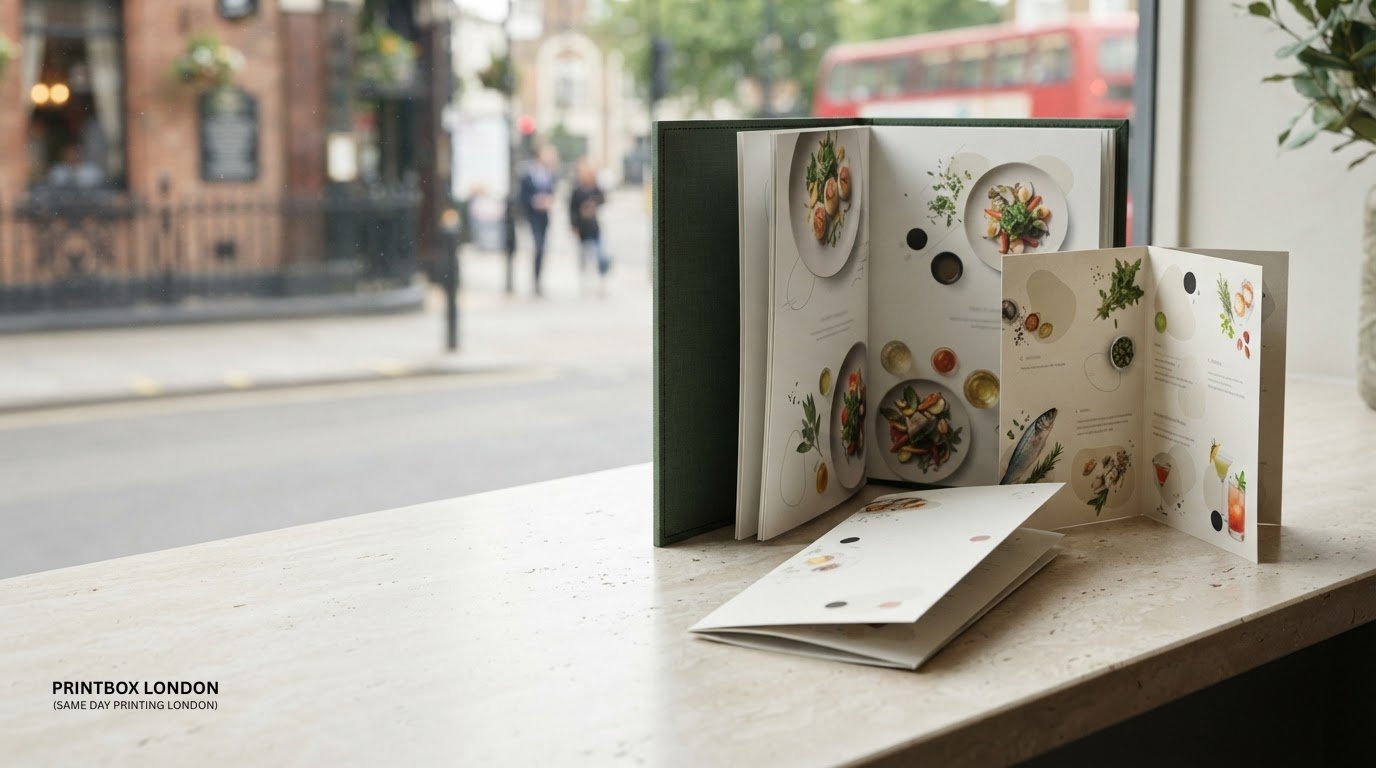
Yes, images can sit alongside dish names and prices in a restaurant menu. For restaurant menu printing in London, choose clear, high-quality images that support the food choices without making the page feel crowded. The same principle works for dine-in, takeaway and pizza menus.
Photos can help customers picture a dish, but they should support the layout rather than compete with essential details. Keep menu artwork organised so the correct version goes to print, especially when dishes, prices or dietary information change.
This guide explains how to choose a menu size, paper stock, finish and printing method for your restaurant. It also covers artwork preparation and practical checks that can catch layout or image problems before printing, helping you produce a menu suited to how customers order.
Key Takeaways
- Use food images to help customers choose, while keeping dish names, prices and other essential details easy to scan.
- Match the menu’s size and fold to how much information it needs to hold and how customers will use it.
- Choose stock and finish with the menu’s handling and presentation in mind; these choices affect its look and feel.
- Prepare artwork with bleed, safe margins, suitable colour and clear images to reduce avoidable print issues.
- Review the final file and proof carefully, especially after changing dishes, prices or menu versions.
Looking for Menu Printing in London?
A print-ready menu starts with artwork that matches its finished size and intended use. For restaurant menu printing in London, plan the layout, images and file setup together before sending artwork to print.
Bleed, resolution and safe margins
Bleed is artwork that extends beyond the trim edge, allowing for slight movement during cutting without leaving an unwanted white line. Follow the printer’s bleed specification and keep dish names, prices and other essential text inside the safe area, where it will not be cut too close to the edge.
Check image resolution at the menu’s actual print size. An image enlarged to fill a panel may look soft, while a low-resolution screenshot can show visible pixels. Review each image at full size and keep important details clear of folds and trim lines.
File formats and print specifications
A correctly prepared PDF is generally suitable for printing because it can preserve page size, fonts and layout. Set the document to the finished dimensions and include the required bleed before exporting. Embed fonts or use the design software’s font-outline option where appropriate to preserve the text’s appearance.
Include the intended page order and make clear whether the menu is single- or double-sided. For a folded design, check that each panel sits in the correct position after folding. The restaurant menu printing page relates to this format, while the job specification should guide the file setup.
Colour, sectioning and typography
Use colour to organise information, not just decorate the page. A restrained palette can distinguish starters, mains, desserts and drinks; a coffee shop might use a separate colour treatment for hot drinks and cakes. Keep text and background contrast strong so dish names remain readable in varied lighting.
Group similar items together and use consistent spacing, headings and price placement. Choose typefaces that remain legible at the printed size; decorative lettering can work for a short heading, but long descriptions need clear, simple text. Check punctuation and prices line by line.
Colour profile and image checks
Screen artwork commonly uses RGB colour, while print workflows use CMYK. Conversion can change how some colours appear, so vivid screen shades may print less brightly. Check the required colour profile and file settings for the job, then review the converted artwork rather than relying only on the screen preview.
Check food photography for sharp focus, clean cropping and consistent colour. Avoid stretching images to fill a space, which can distort plates or packaging. Make sure each image sits beside the correct dish and description.
Seasonal changes and final proofing
For seasonal menus, use clear file names such as “spring lunch menu” and keep the approved version separate from drafts. Before sign-off, compare the proof with the final text, checking dish names, prices, section order, dietary details, folds and page orientation.
Confirm that no text crosses a fold, trim or binding edge. When possible, print a test copy at actual size to spot cramped descriptions, small type and image issues that may be missed on screen.
Menu sizes, stocks and finishes
Choose the format based on the amount of information, how customers will handle the menu and where it will be used. Size, stock, surface and folds all affect its layout and presentation.
Menu sizes and stocks
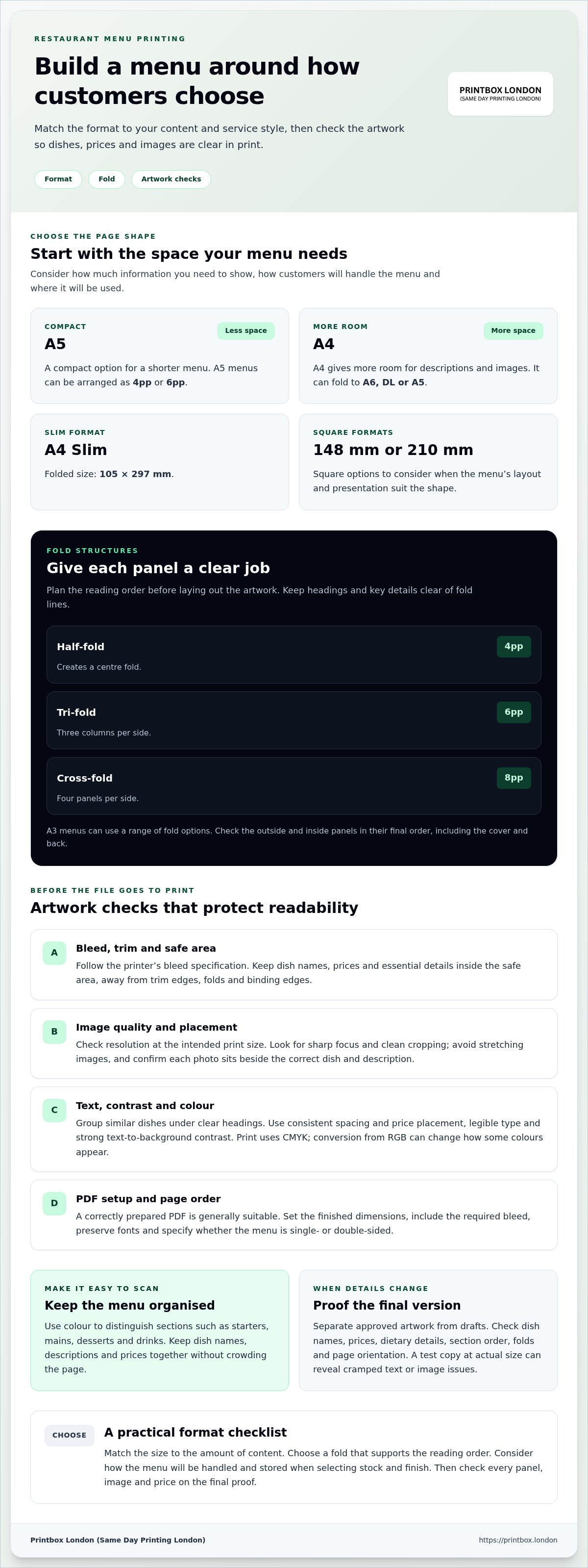
A5 suits a compact menu, while A4 gives more room for descriptions and images. A5 menus can be arranged as 4pp or 6pp. A4 menus can fold to A6, DL or A5, and A4 Slim has a folded size of 105 x 297 mm. Square formats are available at 148 mm or 210 mm.
Stock affects how a menu feels in a customer’s hands. Consider flexibility and stiffness, as well as how the menu will be stored and handled. A single-sheet insert has different needs from a multi-panel menu. Share the finished size and intended use before preparing the artwork.
Check the full menu content against the chosen format before designing. A short drinks list may fit a compact layout, while a broad food menu may need additional panels. Leave enough room for dish names, descriptions and prices without forcing text into narrow columns. The restaurant menu printing page is relevant when planning a printed format.
Print finishes and presentation
A surface finish shapes a menu’s appearance and tactile feel. Consider whether the design should look understated or vibrant, and how photographs, coloured panels and text will work together. Choose a finish that supports the visual style rather than competing with it.
Keep the design consistent across the cover and inside pages. A restrained cover, for example, can frame a colourful food menu, while a drinks list may suit a simpler treatment. Decide how the finished piece should feel, then review a proof for colour balance, contrast and legibility. For venues looking to extend their visual impact across the dining room with dynamic display pieces, Softmotion offers large-format lenticular printing and immersive installations that elevate graphic presentations.
Fold types and finishes
A half-fold creates a centre fold and 4pp. A tri-fold has 3 columns per side and 6pp, while a cross-fold has 4 panels per side and 8pp. A3 menus can use a range of fold options. Match the structure to the reading order, so customers can move through sections without confusion.
For a folded menu, assign content to each panel before laying out the artwork. Check the outside and inside panels in their final order, including the cover and back. Keep headings and key details clear of fold lines. A proof can reveal panel sequence or alignment issues before the menus are used.
Restaurant, takeaway and pizza menu printing
A menu should fit the way customers order. Table, takeaway and pizza menus each need a layout that makes choices, prices and key details easy to find.
Restaurant menus for table service
For a dine-in menu, organise dishes in the order customers make decisions. Separate starters, mains, sides, desserts and drinks with clear headings, and keep each description close to its price. A restaurant with daily specials can use a separate insert, making the main menu easier to update.
Include useful dietary and allergen details beside relevant dishes. Keep the notes readable, rather than hiding them in tiny type at the bottom of the page. Before printing, compare the menu with the approved dish list and check every price, description and dietary marker against the current version.
Takeaway menus for quick ordering
A takeaway menu should help customers order without needing staff to explain the layout. Group choices by category, show prices consistently and make add-ons easy to spot. For example, put pizza sizes and extra toppings beside the relevant pizza rather than in a distant section.
Make contact and ordering details prominent and accurate. If the menu includes collection or delivery information, ensure it reflects the restaurant’s current arrangements. A printed takeaway menu may need a different design from a dine-in copy, even when both feature the same dishes.
Pizza menus and customisation
Pizza menus can become crowded when they combine sizes, toppings, meal deals and sides. Give each pizza a clear name and description, then present choices consistently. For example, list the base pizza first, followed by optional toppings and any price differences.
Put deal conditions beside the offer. Check that photographs show the correct item and descriptions match the kitchen’s current menu. If the menu has many variations, use spacing and headings to separate choices instead of shrinking the type until it is hard to read.
Print runs, updates and finish
Digital printing suits short menu runs, while lithographic printing can be more economical for larger orders. The right method depends on quantity and specification. For seasonal dishes, a shorter run can help avoid holding outdated copies; a stable menu may suit a larger order.
Consider lamination for menus that will be handled frequently, and decide whether its surface suits the design and intended use. Keep a dated master file for each version, such as “pizza menu autumn”, and remove superseded artwork before production to avoid printing an old menu or price list.
Do London menu printers offer design, artwork, and delivery services?
Menu production can involve three separate parts: creating the design, preparing artwork for print and arranging delivery. Define what you need before work begins. A restaurant with finished artwork needs a different service from a café starting with a dish list and logo.
Design support and content preparation
Design turns menu content into a clear layout by arranging dishes into sections, choosing type styles, placing photographs and making prices easy to scan. Start with the final dish names, descriptions, prices, logo and dietary notes. A complete content set gives the designer everything needed to organise the menu.
Decide what the design needs to achieve. A takeaway menu needs a clear ordering route, while a table menu may prioritise browsing and presentation. Share examples of the intended style, such as a minimal drinks list or colourful pizza menu, and focus the brief on audience, format and information hierarchy.
Artwork preparation and proofing
Artwork preparation is the technical step between layout and print. It includes setting the document to its finished dimensions, arranging panels in reading order, and preparing images and text for the chosen format. A print-ready PDF can preserve the approved layout, but it still needs checking before production.
Use a proof to check the content, not just the overall look. Compare dish names and prices with the approved menu, inspect image placement, and review the cover, inside and back panels. For a folded design, check that each panel appears in sequence. Approve the final version only when these details match.
Delivery planning
Delivery is separate from printing. The address, access instructions and required arrival date help define the handover plan. If menus are going to a restaurant venue, provide the correct entrance or reception details, particularly in buildings with several access points. For businesses managing deliveries and administrative post across multiple sites, business service centres such as Postal Xpress N More illustrate how dedicated mailbox and receiving solutions can help keep incoming parcels organised.
Build delivery into the production schedule rather than treating it as an afterthought. Quantity, finishing and packing requirements can affect how an order is prepared for collection or delivery. Keep the approved artwork, print specification and delivery details together in one job brief to avoid confusing the final file with an earlier draft.
What to include in a clear brief
Before ordering menus, note the finished size, format, quantity, page or panel sequence, finish, artwork status and delivery instructions. List any design help separately from print production. For several versions, label each by purpose, such as dine-in, takeaway or drinks, and identify the final file.
A clear division of tasks helps everyone understand what is being produced and how it should be handed over. It also makes proofing easier, as the content, format and delivery details can all be checked against the same brief.
What file formats and print specifications do London menu printers require?
A print-ready PDF is generally a practical format for menu artwork because it can retain page dimensions, typography and layout when exported correctly. A suitable Canva design can also be supplied, but check the export settings and finished format before sending it. Requirements depend on the menu size, fold and print specification.
Prepare the document at its finished size
Set the document to the final flat or folded dimensions, following the template and supplied instructions. For a folded menu, arrange panels in the correct sequence and orientation. Artwork that looks right on screen can still print incorrectly if panels are reversed or out of order.
Include bleed where the design reaches the edge, and keep text and important details within the safe area. Crop marks can show the intended trim but must sit outside the finished artwork. Follow the printer’s artwork guide for bleed and trim setup, as requirements can vary by job.
Check colour and image quality
Digital screens display colour using RGB, while print commonly uses CMYK. Colours can shift during conversion, especially bright or highly saturated shades. Export a print PDF using the agreed colour settings and inspect the result rather than relying only on the design preview.
Check every photograph at its placed size. Enlarging a small image can make food photography look soft, and screenshots often lack the detail needed for clean printing. Review logos, icons and fine text too. Vector artwork stays sharp when scaled, while raster images depend on their original resolution.
Make fonts and page details reliable
Fonts can change if the receiving computer does not have the same typeface. Embed fonts in the PDF or export text as outlines where suitable. Before sending, check that punctuation, symbols, prices and special characters appear correctly. A missing font can alter line breaks and push text into nearby content.
For a multi-page or folded design, inspect page order, orientation and panel placement. Check single- or double-sided printing, finished dimensions, quantity and finish against the order details. A short file name such as “lunch-menu-final” helps identify approved artwork, but remove old versions from the folder first.
Run a final preflight
Open the exported PDF on another device and review each page at normal size. Confirm that images display, fonts look consistent, and no text or important artwork sits across a fold or trim edge. Then compare the proof with the approved menu copy, checking dish names and prices line by line.
For large-format artwork, the same principles apply: document size, image resolution and viewing distance affect the result. Send your menu artwork and print requirements
Printbox London (Same Day Printing London): Same Day Printing
Printbox London (Same Day Printing London) prints restaurant menus and other business materials. If your menu launch also needs promotional materials, Same Day Flyer Printing can support a local promotion, while Same Day Business Card Printing can provide staff or contact cards.
Same-day printing is available for selected quantities and specifications. Turnaround depends on size, artwork readiness, finishing, stock, workload and confirmation time. Share the product, quantity, finished size and artwork details so the job can be assessed against your deadline.
For restaurant menu printing in London, consider the format and final artwork requirements covered above before arranging production. To discuss an urgent printing job, contact Printbox London (Same Day Printing London) or visit printbox.london.
Make your next menu order count
Use your next menu update to make ordering clearer, not just to replace worn copies. Before preparing artwork, decide which dishes or details have changed and who will use the menu. Dine-in and takeaway versions may need different layouts, even when they share the same brand style.
For restaurant menu printing in London, settle the format and content first, then prepare and approve the artwork for production. Printbox London (Same Day Printing London) also offers Same Day Printing, Same Day Poster Printing and Same Day Flyer Printing for related business print needs. Same-day turnaround depends on the order’s quantity and specification.
Keep the final approved file easy to identify. This gives your next update the right starting point and helps keep the menu aligned with your current offer.
A clear brief and approved artwork give your next menu print job a practical starting point.
Frequently Asked Questions
Can I include images in my menu design?
Yes. Use images that reflect the dishes customers will actually receive, and maintain a consistent visual style across the menu. For example, avoid mixing studio food photography with informal phone snapshots on the same page. If you feature a seasonal special, update or remove its image and description when the dish leaves the menu.
How do you print your menus?
Menu production starts with approved content and artwork, followed by printing and any specified finishing. If your restaurant has separate dine-in and takeaway versions, identify each clearly in the order details so the files are matched to the right format. Review the final proof against the approved menu before authorising production, especially after changing dishes or prices.
What are the finishing options for menu printing?
Finishing depends on the menu’s design and production specification. Folding can create panels from a flat sheet. Choose the finished format first, then arrange the artwork for that fold. Include any other requested treatment in the job specification so the finished menu matches the intended presentation.
Where can restaurants get menus printed in London?
Printbox London (Same Day Printing London) is based at 52 West Green Road, South Tottenham, London N15 5NR. Restaurants can arrange menu printing through the business, with service for customers across Greater London. When preparing an order, have the menu artwork and the number of copies ready to provide alongside the required format.
What menu printing options are available in London, including sizes, paper, and finishes?
Choose the menu format based on how customers will use it. A flat sheet can suit a short specials list, while a folded layout can organise a broader selection into sections. Paper and finishing depend on the job specification. Decide whether the menu is for table use, takeaway orders or both, then plan the format accordingly.
What are the turnaround times for menu printing in London?
Turnaround depends on quantity, artwork readiness, finishing requirements and production workload. If the menu needs proof changes, allow time for review and approval before printing. Include the date you need the menus and your collection or delivery preference when arranging the order. These details help establish a practical production schedule.
Article by
Printbox London Team
The Printbox London (Same Day Printing London) team provides practical printing guidance based on real customer requirements and day-to-day print production. We serve customers across Greater London from our Tottenham print shop, with same-day printing available for many products depending on quantity, specification, artwork and production capacity.