
How to Set Up a File for Wire Binding: A Print-Ready Guide
Sep 28, 2026

Could a carefully designed report lose important content at the binding edge? It can if text or images sit too close to the punched holes. Knowing how to set up a file for wire binding means allowing for that clearance before you export, rather than trying to fix a crowded layout after printing.
You may be unsure how much space to leave, whether to send a PDF or an editable file, or how to make the page order clear. Binding-edge clearance depends on the job, so confirm it with your printer instead of relying on a one-size-fits-all measurement. Printbox London (Same Day Printing London) prefers PDF artwork for document printing and can help check file suitability and finishing requirements.
This guide explains how to allow space for punching, check page order and prepare a suitable PDF. It also covers the details to provide when requesting wire binding, including the finished size and binding edge, so your instructions are clear before the file goes to print.
Key Takeaways
- Set the document to the agreed finished size before adjusting the layout. Don’t assume it will be A4.
- When deciding how to set up a file for wire binding, allow space at the binding edge and confirm the required clearance with your printer.
- Check that text, charts and images will remain clear and legible at the final printed size.
- Export the final layout as a PDF, then inspect it for page order, orientation and layout issues.
- Make your print request easier to process by specifying the size, quantity, print sides, finishing and required deadline.
How to set up a file for wire binding: start with the document basics
To prepare a file for wire binding, set the agreed finished page size, leave space at the edge that will be bound, put the pages in reading order and prepare a print-ready file. Wire binding joins the pages along one edge and allows the document to open flat. The Wire binding overview explains the process and common terminology.
Keep the finished page size separate from the binding clearance. The finished size is the final width and height of each page. Clearance is space reserved within the page near the bound edge, so punched holes don’t obscure important content. It is not extra page width. The required allowance depends on the document and finishing, so ask your printer before changing the layout.
Which document details should you decide first?
Confirm the finished size and whether the pages will be portrait or landscape. Don’t assume every job uses A4. Decide whether the document should be printed single-sided or double-sided, where relevant, and check how the pages should read once bound.
Before finalising the artwork, note the quantity, material preference, finishing and required deadline. These details help the printer assess the file and specification. Printbox London (Same Day Printing London) offers document printing and binding, including common A4 and A3 finishing. Confirm binding clearance, stock and turnaround for your specific requirements.
What does binding clearance mean?
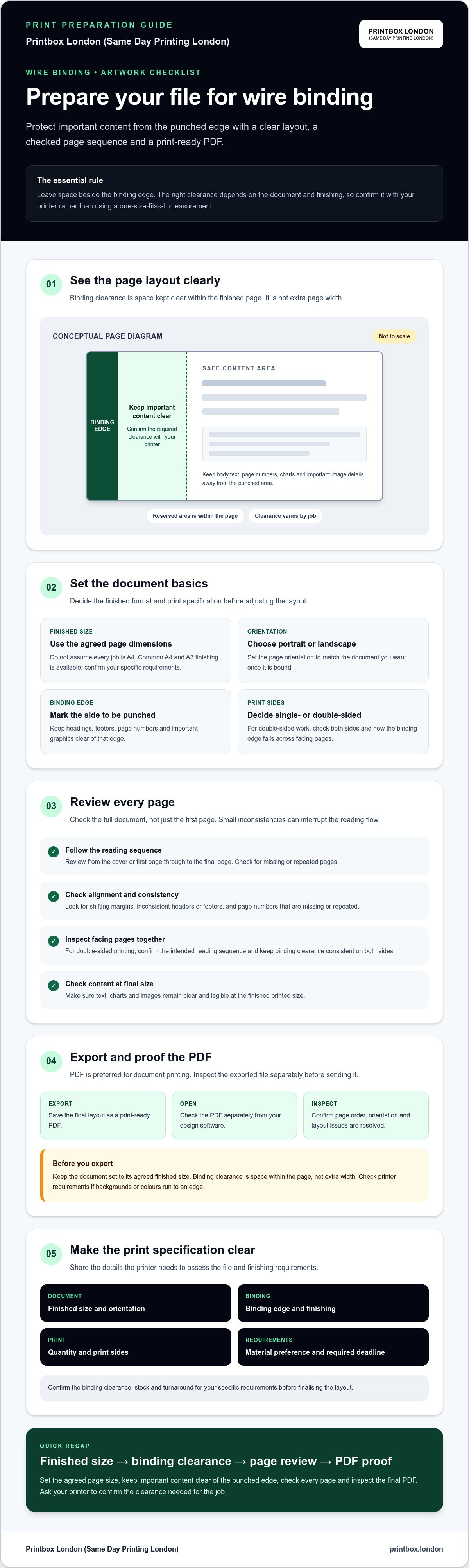
Binding clearance is the reserved space beside the edge that will be punched and bound. Keep body text, page numbers, headings, charts and important parts of images out of this area. Content too close to the edge could be obscured or affected during finishing.
Check every page, not just the first. In a double-sided document, the binding edge may appear on opposite sides of facing pages, depending on the layout. Review both sides and keep the clearance consistent. Don’t rely on a generic measurement. Confirm the appropriate allowance with your printer for the binding specification.
Set page size, margins and layout before exporting your wire-binding file
Set the agreed finished size, reserve space for binding, review the content, then export and inspect the file. This order helps prevent incorrect cropping or essential details being placed too close to the punched edge.
- Set the finished page size. Match the document dimensions to the size agreed with your printer. Don’t assume every wire-bound job uses A4.
- Identify the binding edge. Confirm which side will be bound, then leave a clear area beside it. Ask your printer how much clearance the job needs.
- Review the layout. Check every page for text, footers, page numbers and graphics that could sit too close to the binding edge or trim.
- Export and inspect. Save the final document as a print-ready PDF, then open it separately to check the pages and layout before sending it.
Keep the page dimensions set to the finished size in your design software. Binding clearance is space within the page, not extra width added to it. Keep essential content inside a safe area away from both the binding edge and the trimmed edges. If a background image or colour runs to an edge, check the printer’s file requirements rather than changing the page size to compensate.
How should you allow space beside the binding edge?
Mark the edge that will be bound and check it on every page. Keep wording, table details, page numbers and important image features clear of the area where holes may obscure them. The suitable allowance depends on the binding specification, so confirm it with the printer before finalising the layout.
A simple diagram for a designer could show one page as a rectangle, with one side labelled “binding edge” and an unmeasured strip beside it labelled “keep important content clear”. Label the remaining area “safe content area”. The diagram should explain the principle without suggesting a fixed clearance.
How do you check page order and consistency?
Review the file from the cover or first page through to the final page. Check that every page has the intended size and orientation, and look for shifting margins, inconsistent headers or footers, and missing or repeated page numbers. For double-sided printing, inspect facing pages together and confirm they follow the intended reading sequence.
Preparing a report for printing in London? Printbox London (Same Day Printing London) can help confirm file suitability and binding requirements. Share the finished size and specification when you contact the print team.
Prepare images, fonts and page content for a clean wire-bound print
Once the layout is set, check the content at its intended printed size. PDF is the preferred format for Printbox London (Same Day Printing London), provided it is exported correctly after the layout is final. Open the exported PDF separately from your design software. This can reveal changes to fonts, spacing or image placement that were not obvious in the working file.
Binding clearance is the protected space beside the edge that will be bound. Keep it free of important content so the holes do not obscure it. Check this area on pages with dense text, charts or images, not just on the cover.
What should you check in images, colour and fonts?
Review each image at its intended printed size. For raster images, 300 dpi at final size is a practical target for clear reproduction. Enlarging a small image in the layout does not add detail, so check the source image rather than relying on how it looks on screen. Check charts and small labels too, as they need to remain readable on the finished page.
Use CMYK colour where appropriate for the job, and inspect the exported PDF for unexpected colour changes. Screen colours can look different from printed colours. Check that fonts display as intended, text has not shifted, and nothing is clipped at the page edge or inside the binding clearance. Pay particular attention to page numbers, footnotes and small text.
Do crop marks and bleed belong in a wire-binding file?
Bleed is extra artwork beyond the trim edge, used when a background colour or image needs to print right to the edge after trimming. A 3 mm bleed is common for many print jobs, but it is not a universal requirement. If the page has a white border and no elements run off the edge, bleed may not be needed. Crop marks show where a page should be trimmed, so don’t add them automatically.
Check the printer’s file requirements for bleed and crop marks before exporting. Adding them unnecessarily, or setting them up incorrectly, can cause confusion about the intended finished size. For broader PDF checks, use the article’s Preparing PDFs for Printing: A Practical File-Check Guide alongside the requirements for your specific job.
Finish with a page-by-page review of the PDF at normal viewing size. Confirm that text, images and charts are legible, fonts look right, and no content has moved into the binding clearance or trim area.
Export and proof your wire-binding PDF before sending it to print
For a clear handover, export the final PDF, check it page by page, confirm the print specification and send clear instructions with the file. A well-prepared document is easier to assess and reduces the risk of printing the wrong version or finishing it to the wrong requirements.
Open the exported PDF separately from the programme used to create it. Screenshots are not a substitute for the final print-ready document. They may not show the full page, preserve the intended dimensions or reveal how the file will look when printed.
How do you inspect the exported PDF?
Review every page at normal viewing size. Look for missing text, substituted fonts, clipped content, layout shifts and pages that appear blank or incomplete. Check the page count and sequence against your finished document, including the first and final pages. Remove draft or duplicate sheets before sending the file.
Confirm that the PDF’s dimensions and orientation match the agreed finished format. Check that the binding edge is on the intended side and that page numbers and other details have not moved too close to it. If something looks wrong, correct the source file and export it again rather than asking the printer to rely on a screenshot or make assumptions.
What information should accompany the file?
Give the printer enough detail to check the file against the job. Include:
- Document type, finished size and quantity.
- Whether pages should be printed single-sided or double-sided, where relevant.
- Your material or thickness preference and the binding or other finishing required.
- Your deadline and collection or delivery preference, so available arrangements can be confirmed.
Attach the final artwork, identify which file is approved for printing and ask the printer to confirm binding-specific requirements, including clearance and suitability for the requested finishing. Printbox London (Same Day Printing London) prefers PDF artwork and can check file suitability against the job details. For document printing information, see the Print Copy Scan service.
Before sending, check that the PDF is the correct version, its pages are complete and in order, and the instructions state the finished size, quantity, print sides and finishing. Same-day printing is available for selected quantities and specifications. Confirm the turnaround for your particular order.
Get a wire-binding file ready for professional printing in London
Once you have checked the layout and exported the file, make the handover clear. Send the final PDF with the document details so the printer can assess it against the requested binding and printing specification.
- Final artwork: attach the approved PDF and identify it as the print file.
- Finished size and quantity: state the page dimensions and how many copies you need.
- Print sides: specify single-sided or double-sided printing, where relevant.
- Finishing and material: describe the binding and any material preference.
- Deadline: give your required date or time so availability can be checked.
These details matter because suitability can depend on the file, binding clearance, document size and finishing requirements. Stock and turnaround also need to be confirmed for the specific order. Same-day printing is available for selected quantities and specifications, but the deadline must be checked against the job details.
What happens when you ask for a binding quote?
Share your final file and the details above. Printbox London (Same Day Printing London) can check whether the artwork and requested specification are suitable, then confirm availability for the job. If you are unsure about binding-edge clearance or another file requirement, ask before printing rather than guessing. Agree any material, finishing or timing details for your particular order.
How can London customers take the next step?
Once your order is confirmed ready, collection can be arranged from the Tottenham shop at 52 West Green Road, South Tottenham, London N15 5NR. Printbox London (Same Day Printing London) serves customers across Greater London, including Central, North, East, South and West London, as well as Haringey, Hackney, Islington, Camden, Enfield, Barnet, Westminster, Newham, Redbridge and Waltham Forest. The Tottenham shop is the physical location. If you need delivery, ask whether it can be arranged for your postcode. Availability depends on the job and delivery details, so don’t assume delivery is included or available by a particular time.
Knowing how to set up a file for wire binding gets you most of the way there. Send the print-ready PDF and your requirements to Printbox London (Same Day Printing London) to check the file, binding suitability and available turnaround before proceeding.
Get your wire-bound document ready to print
Good preparation starts with the agreed finished page size, clear space at the binding edge and a page-by-page check of the reading order. Knowing how to set up a file for wire binding also means inspecting the exported PDF, not just the layout on screen. This can help you catch missing text, misplaced page numbers or other visible errors before sending it.
PDF is the preferred artwork format for Printbox London (Same Day Printing London). Document printing, binding and lamination are available, including common A4 and A3 finishing. Confirm binding clearance, stock and finishing requirements for your specific job. Same-day printing is available for selected quantities and specifications, with turnaround dependent on the order.
Have your final PDF and print details ready. The team can help check file suitability and confirm the requirements for your document.
A few careful checks can help you send your document to print with greater confidence.
Frequently Asked Questions
How do I set up a file for wire binding?
Choose the agreed finished page size, identify the binding edge and leave clear space beside it for finishing. Keep important text, page numbers and image details away from that edge. Put pages in the correct reading order, export the final layout as a PDF and inspect every page for layout errors before sending it to print.
How much margin should I leave for wire binding?
There is no single binding margin that suits every job. The required clearance depends on the document and finishing specification, so ask your printer to confirm it before finalising the layout. Keep body text, footers, page numbers and important image details away from the edge that will be bound. Check every page, including the reverse sides of double-sided documents, rather than guessing a measurement.
Should I send a PDF for wire binding?
Yes. A correctly exported PDF is generally the preferred file when your layout is final. It gives the printer a fixed version to inspect for page order, dimensions, orientation and visible layout issues. Open the exported PDF separately from your design programme and check every page. Printbox London (Same Day Printing London) prefers PDF artwork and can confirm whether the file suits your job.
Do I need to add bleed or crop marks to a wire-binding document?
Add bleed only when artwork runs to a trimmed edge, and include crop marks only if the printer requests them. A 3 mm bleed is common, but it is not required for every document or specification. For a page with white borders and no artwork extending beyond the edge, bleed may not be needed. Check the printer’s file requirements before exporting to avoid unnecessary marks or changing the intended finished size.
Can I submit a Word document for wire binding?
Check with the printer before sending a Word document. Because Word files are editable, fonts, spacing or page breaks can appear differently on another system. A final PDF is usually more reliable for preserving the layout you have approved. Printbox London (Same Day Printing London) prefers PDF artwork. Ask whether your Word file can be used or should first be exported to PDF.
Should a wire-bound document be supplied as single pages or spreads?
Unless your printer requests otherwise, prepare the file as individual pages in reading order, not as two-page spreads. This makes it easier to check the page count, orientation and binding edge on each page. For double-sided printing, confirm that the pages form the intended sequence when viewed as facing pages. Follow the printer’s instructions if the specific job requires a different file layout.
What information should I give a printer when ordering wire-bound documents?
Send the final artwork and state the document type, finished size, quantity and whether it should be printed single-sided or double-sided. Include your material or thickness preference, the finishing required and your deadline. Mention any binding-edge clearance you have set, but ask the printer to confirm it suits the specification. Clear details help the printer assess the file and check binding suitability, stock and turnaround for your order.
Can wire-bound documents be printed same day in London?
Same-day printing is available for selected quantities and specifications, but it is not guaranteed for every wire-bound document. Turnaround depends on the job requirements and current capacity, including quantity, artwork and finishing. Contact Printbox London (Same Day Printing London) with your final PDF, size, quantity, binding requirements and deadline to confirm availability. The verified shop is in Tottenham, North London, and serves customers across Greater London.
Article by
Printbox London Team
The Printbox London (Same Day Printing London) team provides practical printing guidance based on real customer requirements and day-to-day print production. We serve customers across Greater London from our Tottenham print shop, with same-day printing available for many products depending on quantity, specification, artwork and production capacity.