
High quality catalogue printing in London for marketing
Nov 21, 2026

A catalogue can look polished on screen and still disappoint in print if the size, paper and finish don’t work together. For high-quality catalogue printing in London, start by matching the format and paper weight to how customers will use it, then prepare artwork at the correct finished size.
Choosing catalogue specifications can feel like a lot when the finished piece also needs to present products clearly and support a campaign. This guide explains how format, paper and finish affect the result, what to prepare for print, and how a well-planned catalogue can help customers browse your range.
You’ll also find practical guidance on matching binding to page count and layout, and keeping images, text and product information clear. Whether you’re producing a compact product list or a detailed sales catalogue, thoughtful choices help the finished piece feel consistent with your brand and easy to use.
Key Takeaways
- Choose a catalogue size and binding that suit its page count, layout and how customers will use it.
- Consider how paper weight and finish affect the catalogue’s appearance, handling and fit with your marketing goals.
- Prepare a print-ready PDF with the correct finished size, image quality, bleed and safe margins.
- Compare paper and substrate choices by considering the balance between presentation, durability and practicality.
- Clarify what support you need, such as artwork checks or proofing, before arranging catalogue printing.
Paper sizes, finishes and weights
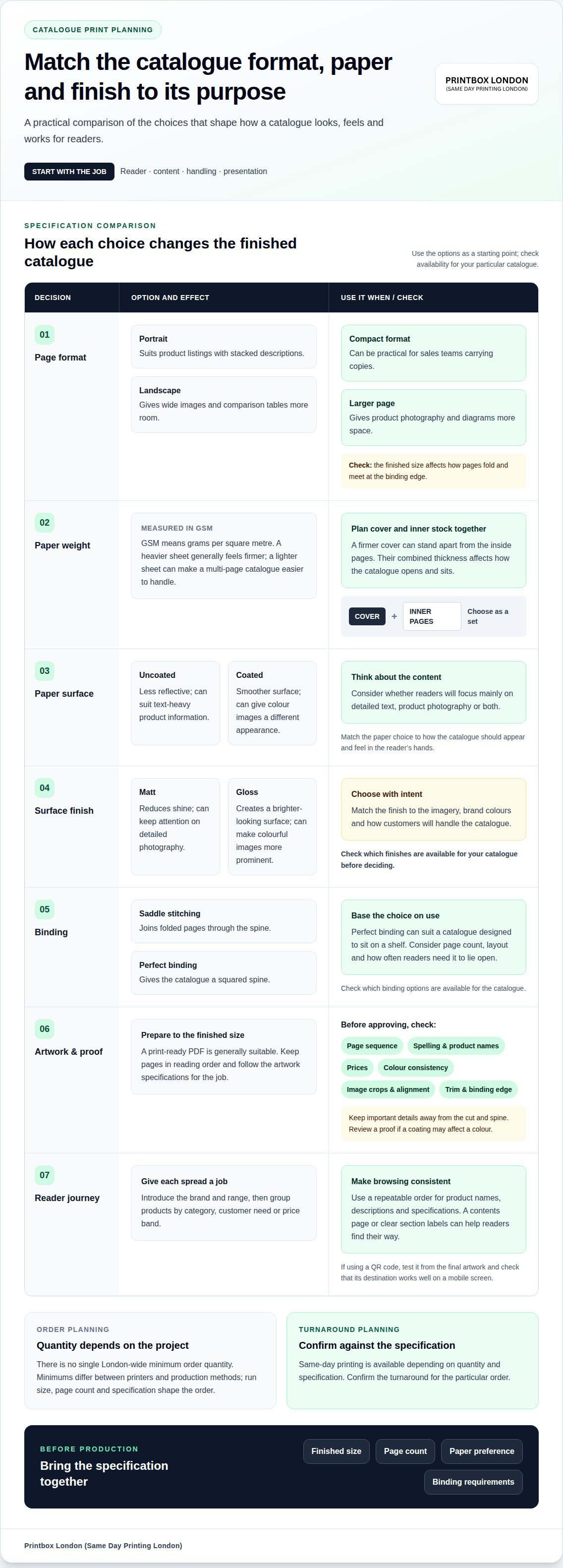
Choose a catalogue format around its contents, not just the amount of paper it uses. A portrait layout suits product listings with stacked descriptions, while landscape gives wide images or comparison tables more room. A compact format can be practical for sales teams carrying copies; a larger page gives product photography and diagrams more space. The finished size also affects how pages fold and meet at the binding edge.
Paper weight is measured in GSM, or grams per square metre. A heavier sheet generally feels firmer, which can help a cover stand apart from the inside pages. Lighter paper can make a multi-page catalogue easier to handle. Choose the cover and inner stock together: their contrast can signal where browsing starts, while their combined thickness affects how the catalogue opens and sits.
- Uncoated paper has a less reflective surface, which can suit text-heavy product information.
- Coated paper has a smoother surface that can give colour images a different appearance.
- Matt finish reduces shine, whilst gloss creates a brighter-looking surface.
- Check which finishes are available for your catalogue before choosing one.
Choose a finish that supports the catalogue’s purpose. A matt cover can keep attention on detailed photography, while gloss can make colourful images more prominent. Other finishes may create a distinct surface effect, so check availability and use them deliberately. Match the finish to the imagery, brand colours and how customers will handle the catalogue.
Binding affects both appearance and use. Saddle stitching joins folded pages through the spine. Perfect binding gives a squared spine, which can suit a catalogue designed to sit on a shelf. Check which binding options are available for your catalogue. The right choice depends on page count, layout and how often readers need the catalogue to lie open.
Before approving a bespoke format, consider the whole job: page dimensions, cover and inner stocks, finish, binding and final thickness. Check that product images, captions and tables remain readable at the chosen size. Leave space near the spine so important details aren’t lost in the binding. If a coating may affect a colour, review a proof before production.
Plan for handling as well as print. A catalogue intended for delivery needs packaging suited to its finished format; copies for collection should be easy to carry and store. Keep small product details legible, with clear contrast between text and background. To discuss a catalogue specification with Printbox London (Same Day Printing London), email the finished size, page count, paper preference and binding requirements.
Catalogue printing for marketing
A marketing catalogue should guide readers from a first impression to a clear next step. Start with one audience and one purpose, such as introducing a seasonal range, supporting a sales meeting or helping customers compare products. A trade catalogue may prioritise technical details—an approach typical for specialist suppliers to processing industries, such as opensupply.eu—while a consumer version might lead with product benefits and lifestyle photography.
Give every spread a job. Use the opening pages to establish the brand and explain the range. Group products by category, customer need or price band, then keep product names, descriptions and specifications consistent. For example, a furniture catalogue could use the same sequence for each item: product name, colour choices, dimensions and a short benefit-led description. A central contents page or clear section labels help readers find their way through.
Plan the call to action before printing. A catalogue can direct readers to a website, shop, sales contact or campaign page. Use a distinct callout beside relevant products rather than hiding the next step in dense copy. A QR code can link a printed page to a product page, but test it from the final artwork and make sure it is large enough to scan. Keep the destination useful on a mobile screen.
There is no single London-wide minimum order quantity for catalogue printing. Minimums differ between printers and production methods, so the required run size, page count and specification shape the order. Set the quantity around the campaign: copies for a sales team, a product launch or a customer mailing each serve a different purpose.
Before approving a proof, check the page sequence, spelling, product names, prices, colour consistency, image crops and alignment. Confirm that contents-page references match the final pages and scan any QR codes. Review the trim and binding edge too, so essential text or product details aren’t too close to the cut or spine.
When arranging catalogue printing, share your deadline and order requirements with Printbox London (Same Day Printing London). Same-day printing is available depending on the quantity and specification; contact the team to confirm the turnaround for your order.
For a catalogue used across several channels, keep the printed document consistent with online product information. Use the same product names, colour descriptions and campaign wording on each platform. That makes it easier for a customer to move from browsing a printed page to placing an order. To discuss a catalogue project’s printing requirements, share the format, quantity and campaign details.
File format, resolution and bleed requirements
A print-ready PDF is generally suitable for a catalogue because it can preserve page layout, fonts and image placement. Export at the intended finished size, with pages in reading order. For a Central London launch, for example, check that the cover appears first and every product spread follows the approved sequence. Follow the artwork specifications for the job.
Resolution describes the image detail available for printing. DPI means dots per inch, while image resolution is often shown in pixels. Check that photographs remain clear at their final printed size. A small web image enlarged to fill a catalogue page can look soft or pixelated. A vector logo can usually be scaled without the loss of edge definition that may affect a low-resolution screenshot.
Consider colour before sending the file. Screens display colour using RGB, while printing commonly uses CMYK inks. A vivid RGB blue or green may look different when converted for print. Use a CMYK document where your design workflow supports it, and review colour-critical images in a proof. For a full-colour catalogue, check that brand colours look consistent across the cover, headings and product photography.
Bleed is artwork that extends beyond the final trim edge. It helps prevent an unprinted sliver if a sheet shifts slightly during trimming. Follow the job’s artwork specifications for bleed rather than guessing a measurement. Keep essential text, prices and product details inside the safe area, away from the trim and binding edge.
- Page format: Set the correct finished size and provide pages in the requested order.
- Images: Check sharpness at final size, especially for full-page product photographs.
- Fonts: Embed fonts or convert them as instructed, so text retains its intended appearance.
- Bleed and trim: Extend background images beyond the cut line, but keep key details safely inside.
- Marks: Add crop marks only when the printer’s specifications request them.
Do a final screen review at actual page size. Check headings, small captions, page numbers, image crops and any QR codes. A brochure with a striking cover can still be difficult to use if product labels are too small or a table breaks across an awkward page turn. A second check of the exported PDF can catch changes made during file conversion.
For an urgent job, send the final file with the catalogue’s size, page count, colour requirements and finishing details. This gives the production team the information needed to assess the artwork and turnaround. Same-day printing is available for selected quantities and specifications; timing depends on the job, artwork readiness and production capacity. A well-prepared file helps avoid delays caused by missing pages, incorrect formatting or images that need replacing.
Paper and substrate options
Paper choice affects more than appearance. It changes how a catalogue feels, handles and performs during distribution. A product guide carried by a sales team has different needs from a reference catalogue kept open on a desk. Start with the main use, then match the paper to the format, page count and binding.
Coated paper has a smooth surface that can suit photographs and colour blocks. Uncoated paper has a more natural feel and can work well for catalogues with substantial written content. A paperboard cover adds firmness, while lighter inner stock can help keep a larger catalogue manageable. These are broad material categories, not fixed specifications: surface, weight and print result vary between paper grades.
Recycled paper is one stock option for a catalogue. The suitable grade depends on the required appearance, print performance and handling. If you make an environmental claim, use precise wording supported by documented recycled content or sourcing information. Avoid a general claim such as “eco-friendly” without evidence explaining what it means for that stock.
- Product photography: A smooth coated stock can present detailed images clearly.
- Long descriptions: An uncoated surface may feel comfortable for extended reading.
- Frequent handling: A firmer cover can help protect pages during repeated use.
- Desk reference: Choose a combination that lets the booklet open and stay usable.
Consider the whole catalogue, not just one sheet. A thicker cover with lighter inner pages creates a clear change between sections. Matching cover and inner paper can give the catalogue a consistent feel from front to back. For a higher page count, combined stock thickness affects the spine and binding choice. Share the intended page count and finished size when arranging the specification.
Print colour can look different across paper surfaces. Coated stock may make saturated product images appear more vivid, while uncoated stock can soften their appearance. If exact brand colours matter, assess them on the proposed material rather than relying only on a screen preview. A proof helps show how the chosen paper handles photographs, fine text and solid colour areas.
When briefing a catalogue, describe how customers will use it: for example, a sales representative carrying copies, a shop-counter display or a mailed product guide. Include the date it is needed and any campaign deadline. Quantity, finishing and paper selection can affect production planning, so provide these details together.
Set the stock decision alongside the campaign budget and distribution plan. A compact catalogue sent by post may need a different paper balance from a substantial showroom reference. Clear requirements make it easier to choose suitable options without specifying heavier or more elaborate stock than the job needs.
Planning design, proofing, delivery and fulfilment for a catalogue
Design, proofing, printing and delivery are separate parts of a catalogue project. The following are general planning considerations, not services confirmed as available from Printbox London (Same Day Printing London). Your brief should identify the steps required, from preparing pages to getting finished copies to their destination. For example, a product launch may need a final artwork check and copies collected or delivered to one office. A customer mailing may also require individual packing and address handling.
Design support concerns the pages themselves: structure, typography, image placement and consistent product information. A clear design brief can identify the audience, campaign purpose, brand guidelines and essential content. For a seasonal catalogue, this might include a launch date, updated product descriptions and a revised contents page. If the artwork is complete, specify that production should use the supplied file rather than redesign the layout. Confirm any design support required with the printer.
Proofing gives you a chance to review the catalogue before the full run proceeds. Whether proofing is available should be confirmed with the printer. A proof can reveal issues that are difficult to spot on screen, including page order, colour balance, cropped photographs and small captions. Review the front cover, a product spread and the final page carefully. Check product names, prices, contact details and QR codes against the approved document.
Keep proof approval clear. Name one person to gather comments, and send one consolidated set of corrections. If several colleagues send separate versions, conflicting edits can delay approval or leave an old detail in the final file. Mark changes by page and location, such as “page 6, second product description”, then review the amended proof before authorising print.
Plan delivery around the destination and the date the catalogues are needed. A single office delivery differs from sending separate parcels to branches or customers. Provide the complete address and any relevant access or receiving-hour information in the project details. For a campaign involving multiple locations, clearly label each carton or allocation. Confirm whether delivery can be arranged for your order.
Fulfilment can involve sorting copies by destination, packing them, and preparing the information needed for dispatch. It is separate from printing, so define the exact handover point. For example, specify whether the finished copies go to one address or are divided into named batches. These are general considerations, not confirmed Printbox London (Same Day Printing London) services. Avoid assuming that a delivery arrangement includes packing, postage or mailing-list processing; check what is available before ordering.
These details also affect scheduling. Artwork approval, proof changes, print quantity, packing requirements and delivery arrangements all influence the production sequence. Set the campaign date first, then work backwards through approval, printing and dispatch milestones. For a catalogue project, provide the finished size, page count, quantity, artwork status and destination details together.
For multiple destinations, provide an address and any relevant access or receiving-hour information for each parcel or batch. Confirm the required handover or delivery arrangement and whether packing or postage is needed.
Printbox London (Same Day Printing London): Catalogue Printing
Printbox London (Same Day Printing London) prints catalogues for businesses preparing product guides, sales materials and campaign catalogues. For high quality catalogue printing in London, share the finished size, page count, quantity and artwork to set out the production brief. Choose paper and binding to suit how readers will use the catalogue, whether at a counter or during a sales meeting.
If your campaign is urgent, same-day printing is available for selected quantities and specifications. Include the artwork status and required date when discussing the job, as turnaround depends on the order. Same-day poster and flyer printing can also support a campaign.
Contact Printbox London (Same Day Printing London) to discuss your catalogue requirements.
Plan the next catalogue edition
A printed catalogue can remain useful beyond its launch. Treat it as a marketing asset with a clear review point, so product details and campaign messages stay relevant. Assign someone to manage updates, especially when stock, descriptions or contact details change. This makes the next edition easier to organise.
Keep a record of the approved version and its purpose. If a future edition targets a different audience, note what should change and what should remain consistent with your brand. For high quality catalogue printing in London, a concise production brief gives the project a clear starting point and keeps decisions focused on the next campaign.
Bring your catalogue plans together and take the next step with confidence.
Frequently Asked Questions
What catalogue paper stocks and finishes are available from London printers?
Options include matt, gloss, silk, recycled and waterproof stocks, with binding, laminating, custom cutting, foiling and embossing among the available finishes. Not every combination suits every catalogue. Waterproof stock, for example, may not be necessary for a catalogue used indoors, while a special finish could draw attention to the cover. Choose options to suit the catalogue’s handling, presentation and intended use, then include them in the print specification.
What are typical turnaround times for catalogue printing in London?
There isn’t one fixed turnaround for every catalogue. Timing depends on page count, quantity, stock, finishing and artwork readiness. A short catalogue with final artwork has different production needs from a larger run requiring binding and proofing. Give Printbox London (Same Day Printing London) your required date and complete specification together. This helps the team assess the production sequence and whether the schedule suits the job.
What file formats, artwork specifications and bleed settings do London catalogue printers require?
PDF is the preferred format; JPG or JPEG, PNG, TIFF and ZIP files are also accepted. Raster images should target 300 dpi at final size, with artwork set to CMYK. A common bleed allowance is 3 mm, but it isn’t universal for every product. Include the finished page size and check that the file contains the correct page order. Follow the job-specific artwork instructions for bleed and file setup.
What delivery costs and areas do London catalogue printers cover?
For catalogue printing in London, collection is available from the Tottenham shop, and same-day local courier delivery may be available depending on postcode, job size, completion time and courier availability. Provide the full delivery address and required date when discussing the order.
Article by
Printbox London Team
The Printbox London (Same Day Printing London) team provides practical printing guidance based on real customer requirements and day-to-day print production. We serve customers across Greater London from our Tottenham print shop, with same-day printing available for many products depending on quantity, specification, artwork and production capacity.