
Emergency Document Printing in London: Prices and Quote Details
Oct 27, 2026
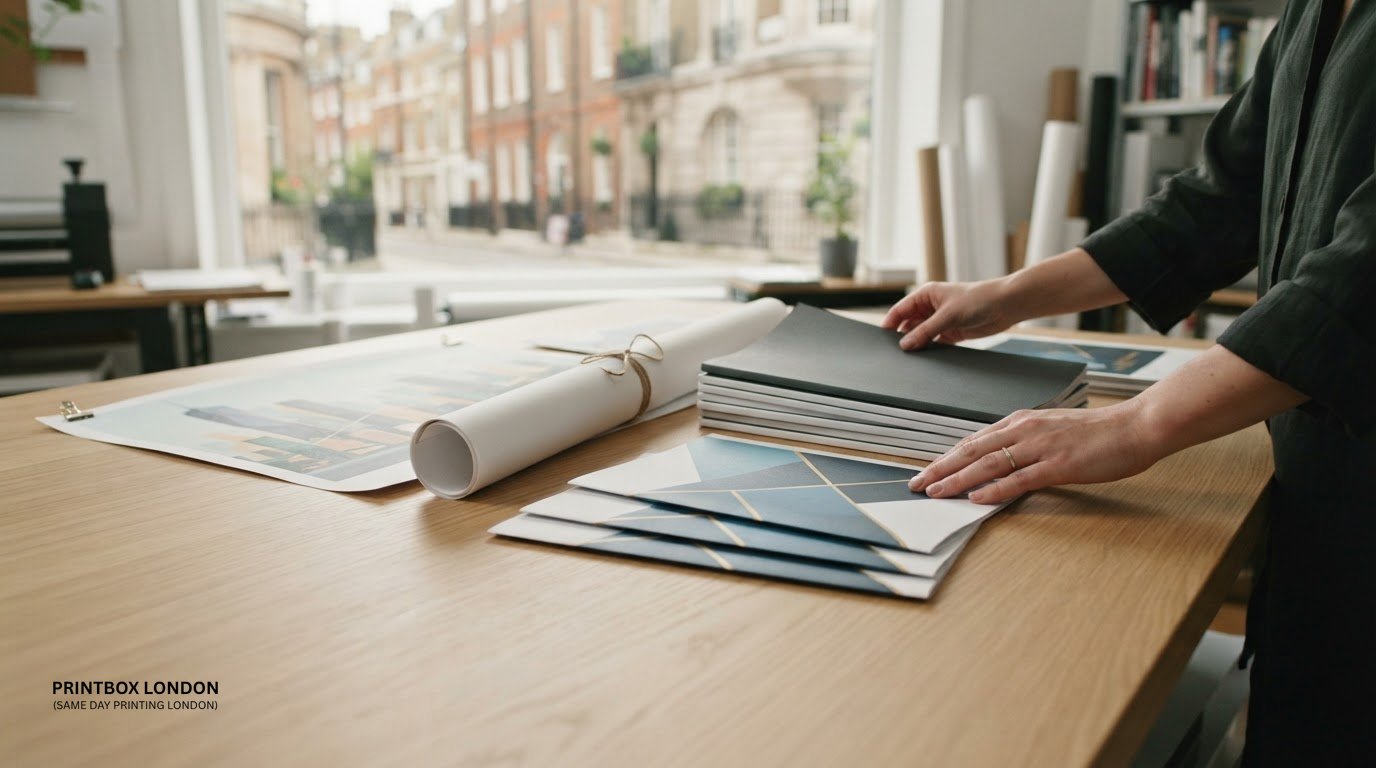
A last-minute print job can mean anything from a set of reports to event materials. Emergency document printing in London can cover documents, presentations, booklets and plans, as well as related urgent jobs such as flyers and posters. Same-day printing is available depending on the quantity and specification.
It’s understandable to want a clear price and a realistic collection or delivery time before sending files. The cost depends on details such as quantity, finished size, colour, paper and finishing, so a useful quote starts with a precise job description. This guide explains what can be printed urgently, how to prepare your files and which details to share, including print sides, paper preference and your deadline. You’ll also learn what can affect a walk-in price and why artwork that’s ready to print can help keep an urgent job moving.
Key Takeaways
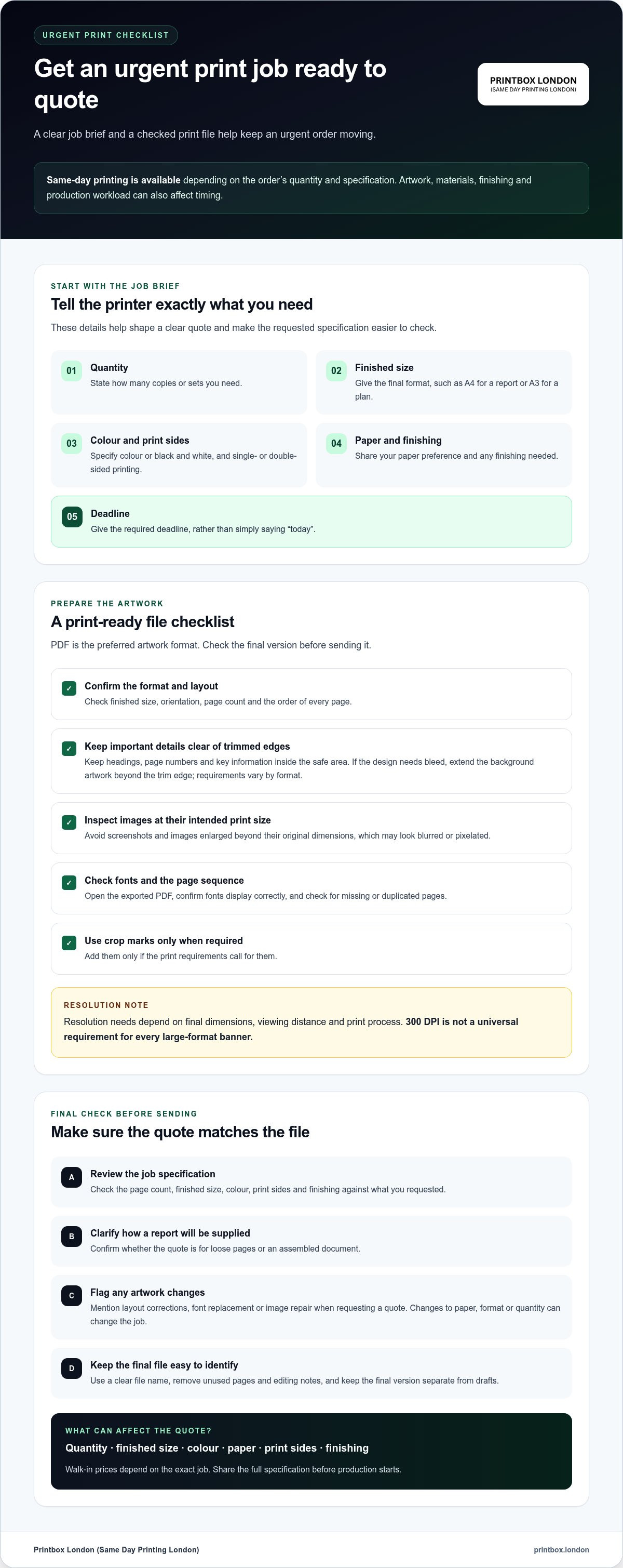
- Share the quantity, finished size, colour, print sides and deadline to help shape a clear quote.
- Prepare a print-ready PDF where possible, and check the layout, image quality and final dimensions before sending.
- Walk-in prices depend on the job’s specifications, including quantity, paper and any finishing.
- Urgent jobs can include documents and presentations, as well as printed products such as flyers, posters and booklets.
- Same-day printing is available depending on the order’s quantity and specification, so send complete job details to plan the next step.
Need urgent printing in London today?
For urgent printing in London, decide whether you’ll collect the job or need delivery. Same-day printing and delivery depend on the artwork, print type, quantity, production time, approval time and courier availability. Share the finished format, deadline and full delivery address together. These details help plan production and the handover, whether the destination is an office or event venue.
For collection, give your name and a mobile number, then agree a collection window before travelling. If you expect to collect after 8pm, call ahead so the job can be prepared at the counter. A central London address can take time to reach, especially if your route includes a venue reception or access instructions. Include a contact name, phone number and email address for courier handover.
Courier planning depends on the print job’s size, weight, urgency and destination. A motorbike courier can suit a smaller print package; a car or van may suit larger or heavier work. State the required arrival time, not just “today”. Include the building name, street, postcode, entrance instructions and floor. For a venue, name the reception desk or other agreed handover point.
Same-day delivery and overnight delivery have different planning windows. For overnight printing, files and payment received by 21:00 are a realistic window for delivery before 9am, subject to capacity. Production time, approval and courier arrangements affect the schedule. Urgent off-site event printing can sometimes fit a 6 to 12 hour window, depending on the job and logistics. Give an exact deadline when requesting this timing.
What are the opening hours of emergency print shops in central London? There’s no single opening-hours schedule across central London; each shop sets its own hours. Check the selected shop’s current hours before arranging an evening collection.
Which London printers offer document printing near major stations and airports? There isn’t one station or airport directory covering print shops. Search for the specific station or airport, then compare a shop’s address and opening hours against your collection deadline.
“Emergency document” can also mean a travel document, rather than printing. HM Passport Office says a person can apply online for a UK emergency travel document only if they’ve had a passport issued on or after 1 January 2006.
Preparing emergency artwork and print files
Urgent printing moves more smoothly when the file is ready for production. Check the document’s size, layout and final pages before sending it.
Preparing Artwork for Urgent Printing
Start with the exact finished format, such as A4 for a report or A3 for a plan. Keep headings, page numbers and important details inside the safe area, away from edges that could be trimmed. If the design needs bleed, extend background artwork beyond the trim edge. Bleed is the extra image area removed during trimming; requirements vary by format.
Print-Ready Files and Resolution
PDF is the preferred artwork format. Export the final version, check that fonts display correctly and confirm every page is in the intended order. If you are starting from physical sheets and need to digitise them quickly on your smartphone, scantrixpdfscanner.app can help generate clean, print-ready files. For images, inspect the original file at its intended print size. A screenshot or an image enlarged beyond its original dimensions may look blurred or pixelated.
Resolution needs depend on the final dimensions, viewing distance and print process. The idea that every large-format banner needs 300 DPI is a misconception. A large graphic viewed from further away has different resolution needs from a document held close. Check images at their intended size, and avoid enlarging small web graphics for a large print.
Before sending, open the PDF on another screen or device. Confirm the finished size, orientation, page count, colour and single- or double-sided layout. Add crop marks only if the print requirements call for them. For a multi-page report, check the first and last pages, then scan the sequence for missing or duplicated pages.
- Use clear file names, such as “Board-pack-final.pdf”.
- Remove unused pages, comments and editing notes.
- Check small text, logos and images at print size.
- Keep the final version separate from drafts.
For confidential documents, remove personal details that are not needed in print and send only the final file through a controlled transfer method. Collect the finished pages promptly and avoid leaving sensitive paperwork unattended. For organisations regularly handling confidential digital files and network transfers, managed IT support from Networking2000 can help ensure business systems and data infrastructure remain dependable and secure.
Artwork changes can affect turnaround. If a file needs layout corrections, font replacement or image repair, state that when requesting a quote. For an urgent job, send the final PDF with clear print instructions; use the contact form for a print enquiry to share the requirements.
For an urgent job, send print-ready artwork and clear instructions. Same-day printing is available for selected quantities and specifications; timing depends on the artwork, quantity, materials, finishing and production workload. Review the file and approve the specification promptly to help keep the job moving.
Walk-in printing prices and payment methods
The price depends on the exact job, not simply the number of sheets. A short black-and-white document run differs from colour pages with graphics, a larger format or finishing. Describe the full job before production starts, including quantity, size, material and finishing, so the quote reflects what you need.
Check that the quote clearly describes the requested work. Confirm the page count, finished size, colour or black-and-white output, single- or double-sided printing and finishing. For a report, clarify whether it covers loose pages or an assembled document. Changes to paper, format or quantity can change the job, so compare like with like.
There’s no single London-wide ID or payment rule for walk-in printing. Each shop sets its own requirements and accepted payment methods, so don’t assume identification, cash or a particular card is required. Before travelling, check the shop’s current payment arrangements and bring the order details and final file. For confidential or business documents, keep the file and quote information together.
For urgent work, make approval explicit. Compare the written quote with your requested specification before authorising production. Confirm the total, quantity, colour, format, finishing and collection or delivery arrangement. If anything differs, request a corrected quote before approval. This quick check can prevent errors such as the wrong size or print sides.
- Separate print costs from courier or delivery charges in the quote.
- Check whether the quoted amount covers every requested page and copy.
- Confirm how changes after approval affect the final charge.
- Keep a record of the approved specification and payment.
Production and courier booking follow approval and payment, so prompt approval is part of the timing plan. For collection, agree when the order will be ready before setting off. For delivery, include the full address and required arrival time when requesting a quote, so the courier requirement can be considered alongside the print job.
For a walk-in quote, describe the job in one clear sentence, then give the page count, format, colour preference and deadline. Add finishing and delivery details where needed. A complete brief helps the shop quote the requested work accurately and gives you a clear basis for approval.
Information needed for a print quote
A clear brief helps the printer price the requested job and plan its turnaround. Include the file, quantity, finished format, print settings and deadline. For example, “A4 report, 20 copies, colour, single-sided, collect today” gives more direction than “urgent printing”. Add delivery details if the finished work must reach an address.
Start with the quantity and finished size. Say whether you need one copy or several, and give the final dimensions, such as A4 or A3. For multi-page documents, state the page count and whether each copy should include every page. Mention any unusual dimensions directly. These details help distinguish a short document run from a larger-format job.
Next, describe how each page should print. Specify colour or black and white, single- or double-sided output, and any finishing. If you are unsure of a technical term, describe the result instead. For example, say whether pages should remain loose or be assembled. Clear instructions avoid assumptions about the finished document.
- File: Name the digital file and identify the final version.
- Quantity: Give the number of copies and pages per copy.
- Format: State the finished size and orientation.
- Print settings: Specify colour, print sides and finishing.
- Timing: Give the deadline and preferred collection window.
- Delivery: Provide the full address and requested arrival time.
Send the final artwork with the brief, rather than a draft followed by corrections. A print-ready PDF makes the requested layout easier to understand. If you are sending several files, label each by purpose, such as “report-final” and “appendix-final”, and identify which version is current. This helps prevent an older file being quoted or printed.
Be specific about timing. “Needed today” leaves the collection or arrival time open; “ready for collection before the afternoon meeting” gives a clearer deadline. For delivery, include the recipient’s name, contact details and useful entrance instructions. The courier needs the full address and required arrival time to plan the handover.
Before approving the quote, compare it with your original brief. Confirm the quantity, dimensions, colour, print sides, finishing and collection or delivery arrangement. If a detail changes, such as the page count or format, tell the printer before production begins. Matching the quote against the file can catch a mismatch early.
Send the artwork and job details together in one message. This gives the printer a single reference for the requested work, deadline and handover. Keep the approved brief available until collection or delivery, especially if someone else will receive the finished documents.
Printed products including flyers, posters and booklets
An urgent print job can involve more than loose documents. Flyers, posters and booklets each need different artwork and production decisions. Choose the product according to how people will use it: a meeting handout, a venue poster and an event programme have different format and finishing needs.
For posters, specify the finished dimensions and where viewers will see them. A-series, B-series and suitable custom sizes can be produced where production allows. Artwork for a large poster should keep key text and logos clear at the intended viewing distance. State whether you need one poster or several, and whether the design is single-sided.
Flyers can suit event details, menus or promotional information. Formats can include A-series sizes, DL, square and suitable custom dimensions. Choose a size that keeps the essential message readable without crowding the page. Tell the printer whether the flyer is single- or double-sided, and provide the exact quantity. Same-day availability depends on quantity, paper, artwork, finishing and capacity.
Booklets organise content into a portable, paged format for programmes, reports, training material or product information. Prepare pages in reading order and identify the intended cover. Specify the finished size, page count, colour requirements and binding. Stapled, wire and comb binding are options; the right choice depends on the document and how readers will use it.
For an event deadline, prioritise the item attendees need first. A poster may guide visitors at the entrance, while a booklet carries the full programme. If you need both, list their quantities and specifications separately. Flag technical artwork, unusual dimensions or finishing needs early, as these can affect production planning and turnaround.
Other urgent jobs may include business cards, plans or presentation documents. State the finished size of technical drawings so details remain legible. A presentation pack may require colour pages and a defined page sequence. Describe the purpose, format and quantity of each item separately, rather than grouping different products into a general request.
- Match the product to its use: display, handout or bound reference.
- Give each item its own format, quantity and print instructions.
- Send final artwork and identify any finishing or binding requirements.
Printbox London (Same Day Printing London): Same Day Printing
Printbox London (Same Day Printing London) provides same-day printing for urgent jobs, with turnaround shaped by the order’s quantity and specification. If your deadline is tight, share the finished artwork, quantity, size and required collection or delivery time when requesting a quote. Clear details help establish the production plan before you approve the job.
Same Day Poster Printing, Same Day Flyer Printing and Same Day Business Card Printing can help when event materials or business essentials are needed quickly. Timing depends on the quantity, artwork, finishing and other job requirements. Include these details upfront when requesting a quote.
Contact Printbox London (Same Day Printing London) with your print requirements, or visit printbox.london.
Make the next print decision count
When a deadline is tight, decide which printed item is essential for the next step. A meeting may depend on its main presentation; an event may need its poster or flyer before supporting materials. Setting that priority focuses your request and gives the printer a clear starting point.
For emergency document printing in London, Printbox London (Same Day Printing London) offers Same Day Printing, including Same Day Poster Printing and Same Day Flyer Printing. Share the priority item and deadline when you get in touch. Same-day printing is available depending on quantity and specification.
A clear decision now can make the next step simpler. Send your request when you’re ready, and keep the final file to hand.
With clear priorities and a complete brief, you can move an urgent print job forward with confidence.
Frequently Asked Questions
What should you send with an urgent print enquiry?
Send the final file and identify the exact version to print. Include the product, quantity, finished size, colour preference, print sides and any finishing. If you need several items, label each file and state its matching quantity. Give the deadline and say whether you prefer collection or delivery. For example, label a presentation file separately from its handouts to prevent a mix-up.
Where can I get emergency document printing in London today?
Printbox London (Same Day Printing London) provides document printing from its shop at 52 West Green Road, South Tottenham, London N15 5NR. Same-day printing is available for selected quantities and specifications. Before travelling, send the job details and arrange the collection plan. This is useful for a report, presentation or document pack that needs printing on the day.
Which London print shops offer same-day or urgent document printing?
Printbox London (Same Day Printing London) offers same-day printing, including document printing, posters and flyers. Its Tottenham shop serves customers across Greater London, including people travelling from central, north, east, south and west London. Same-day production depends on the job’s requirements. For a multi-part request, separate document printing from any accompanying event materials in your enquiry.
How much does urgent black-and-white or colour printing cost in London?
The price depends on the job and is provided after a quote request. Quantity, finished size, material and finishing affect the cost. Colour pages, black-and-white pages and binding are different requirements, so describe each clearly rather than requesting a general document-printing price. Ask for the quote to include all requested finishing and any courier delivery.
Can London print shops print and bind documents from email or USB?
Printbox London (Same Day Printing London) provides document printing and binding. Prepare a digital file in a suitable format, such as PDF, JPEG, PNG or TIFF, and specify the required binding. You can also provide designs through Google Drive, Dropbox or WeTransfer. State the page order and whether the finished document should be assembled or supplied loose.
Can I get urgent printing delivered within London, and how quickly?
Same-day courier delivery across London is available for selected orders, depending on postcode, job size, completion time and courier availability. Give the full delivery address, recipient’s name and required arrival time when arranging the job. A smaller document package and a bulky print order can need different courier arrangements. Keep collection as an alternative if delivery timing does not suit your deadline.
What file formats, paper sizes, and file limits do London print shops accept?
Printbox London (Same Day Printing London) accepts PDF, JPG or JPEG, PNG, TIFF and ZIP artwork files. Standard ISO sizes include A4 at 210 × 297 mm, A3 at 297 × 420 mm and A0 at 841 × 1189 mm. B2 and suitable custom sizes are also options for some products. State the finished dimensions in your enquiry, especially for non-standard work.
Article by
Printbox London Team
The Printbox London (Same Day Printing London) team provides practical printing guidance based on real customer requirements and day-to-day print production. We serve customers across Greater London from our Tottenham print shop, with same-day printing available for many products depending on quantity, specification, artwork and production capacity.