
Comb binding services near you for document printing
Nov 06, 2026
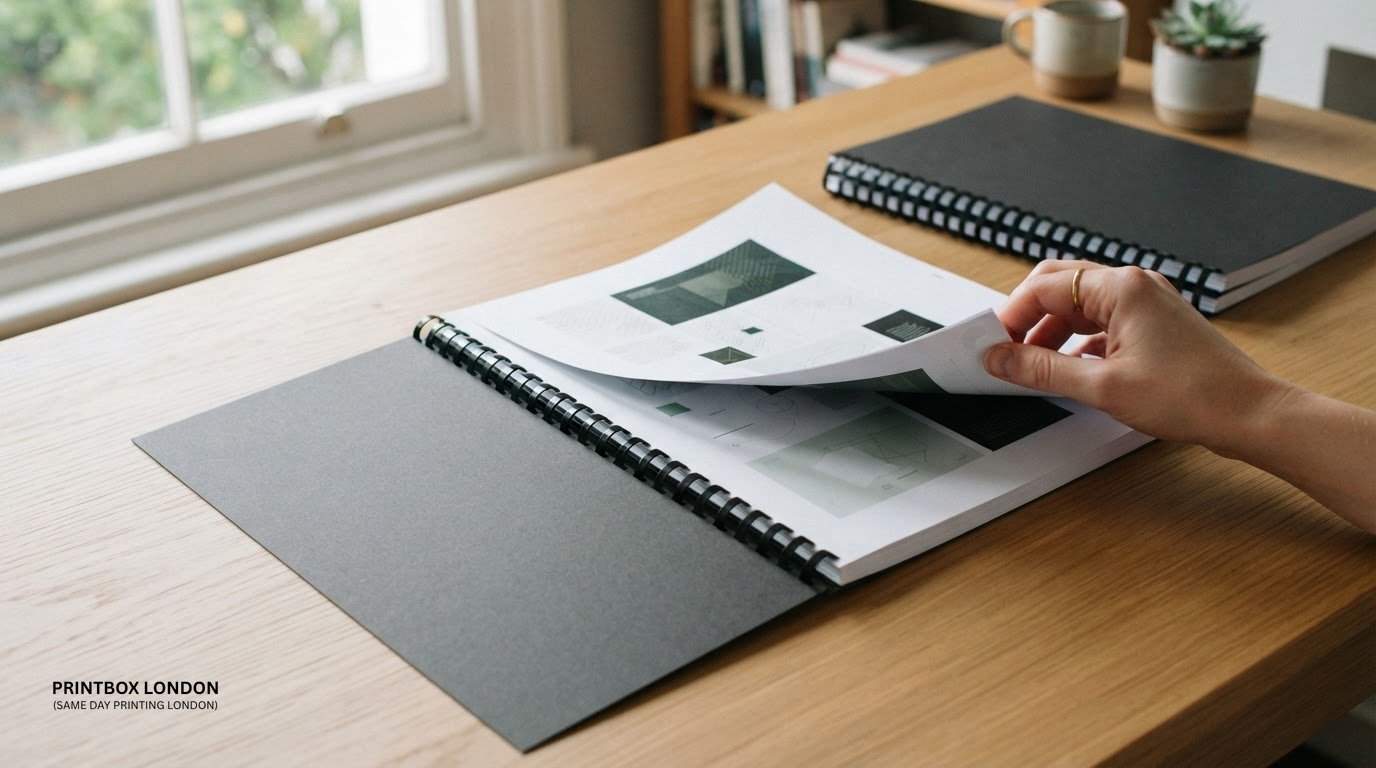
A document can look finished without being difficult to update. If you need comb binding for documents near you, the process uses a plastic comb threaded through punched holes along the page edge to hold the pages together. It gives reports, theses and other documents a neat, practical finish.
Choosing a comb is about more than appearance. The document’s thickness determines the comb size, and the pages need to be punched before the comb is fitted. Get these details right and the finished document will be easier to use and share.
This guide explains how comb binding works, how to prepare and punch your pages, and how to choose a comb size to suit your document. You’ll also learn whether a comb can be reused and when professional document binding can save you the work of punching and assembling pages yourself.
Key Takeaways
- Prepare pages in the correct order and allow for punched holes along the binding edge before printing or assembly.
- Choose a comb that suits the document’s thickness so pages fit securely and can turn comfortably.
- Consider how the document will be used: comb binding is practical, but its pages don’t turn fully around the spine.
- Binding costs depend on the job’s requirements, including the document and print specification; request a quote for your project.
- Have your file and finished paper size ready to help move the binding job forward smoothly.
Preparing documents and punching holes
Comb binding starts with a correctly ordered document, suitable paper and punched holes along the binding edge. For an A4 document, that edge is usually the long side. A comb-binding machine punches the holes, then opens and closes a plastic comb around the pages. Covers can help protect the pages of a comb-bound document.
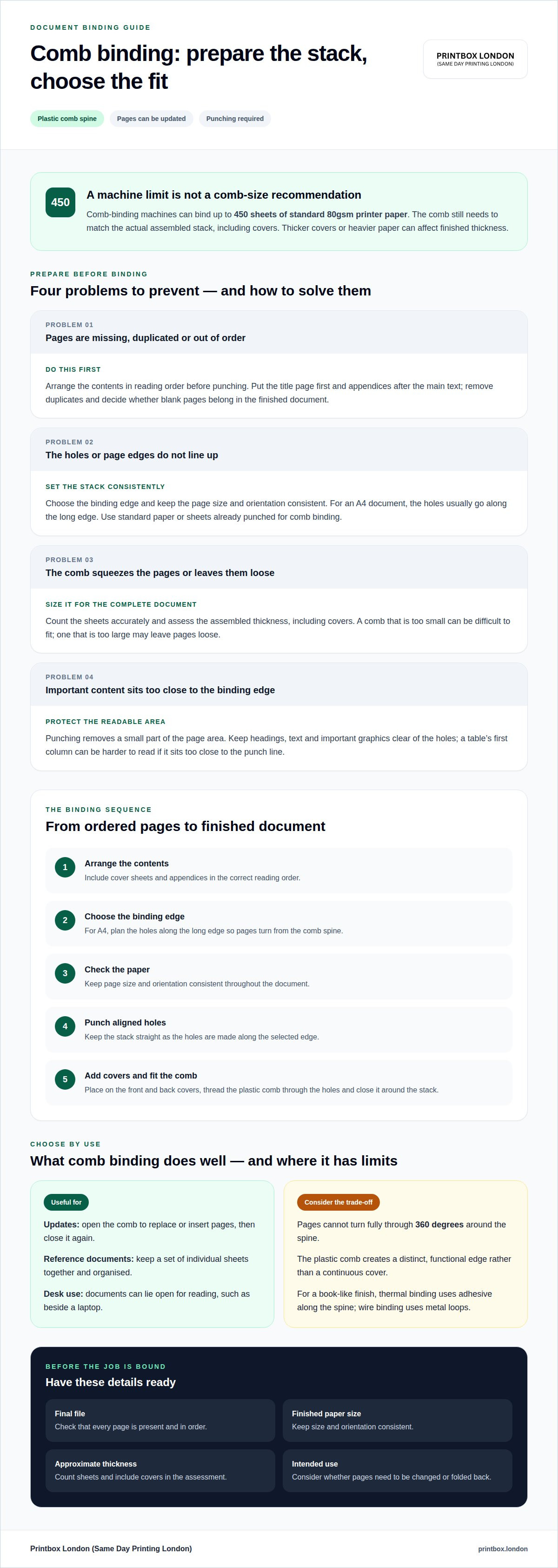
Prepare the contents before binding. Check that every page is included and in the correct reading order. For a report, put the title page first and appendices after the main text. Remove duplicates and decide whether any blank pages belong in the finished document. These checks are easier before the pages are punched and fitted onto a comb.
Use standard paper or paper that has already been punched for comb binding. If the pages need printing, keep the chosen paper size consistent throughout the document. A4 pages, for example, need holes aligned along the same long edge. Mixing page sizes or turning some sheets the wrong way can leave the finished document uneven.
The binding process follows a clear sequence:
- Arrange the contents. Put the pages in reading order, including any cover sheets and appendices.
- Choose the binding edge. For an A4 document, plan the holes along the long edge so the pages turn from the comb spine.
- Check the paper. Use standard paper or sheets already punched for comb binding. Keep the document’s page size and orientation consistent.
- Punch the pages. Use a comb-binding machine to make aligned holes along the selected edge. Keep the stack straight so the holes line up.
- Fit the covers and comb. Add a front and back cover, then thread the plastic comb through the holes and close it around the stack.
Page count helps determine the comb size. The plastic comb needs to hold the complete stack, including its covers, without squeezing the pages too tightly. A comb that’s too small can make assembly difficult; one that’s too large may leave pages loose. Count the sheets accurately before choosing a size.
Machine capacity is another preparation check. Comb-binding machines can bind up to 450 sheets of standard 80gsm printer paper. That figure describes a maximum capacity, not a suitable comb size for every document. The comb must still match the actual stack. A thicker cover or heavier paper can also affect the finished thickness, so assess the assembled contents rather than relying on page count alone.
For comb binding for documents near you, have the final file, paper size, page order and approximate thickness ready. These details help determine how the document should be punched and which comb will hold it securely.
Advantages and disadvantages of comb binding
Comb binding suits documents that need a practical, editable spine. The plastic comb can be opened to add or remove pages, then closed again. For example, you can update a training manual when a procedure changes. That flexibility makes comb binding useful for working documents, reports and reference copies.
The binding also holds individual sheets together without attaching them permanently along the spine. Readers can turn pages and lay the document open for reference. However, comb-bound pages cannot turn through a full 360 degrees on the spine. That matters when someone needs to fold a manual back on itself while working.
Unlike wire binding, comb binding uses a plastic spine rather than metal loops. Thermal binding uses adhesive along the spine to hold pages inside a cover, creating a more book-like finish. Choose comb binding when you need to reopen the spine; wire or thermal binding may better suit other presentation preferences.
- Pages can be changed. Open the comb, replace a page or insert an update, then close it again. This can help with manuals or internal reports that change over time.
- The pages stay organised. A comb holds a complete stack together, making it easier to distribute a report or keep a set of reference sheets in order.
- The spine is visible. The comb forms a distinct edge along the document. This gives the finished piece a functional appearance, rather than the continuous cover of a thermal-bound book.
- The binding has limits. Pages do not rotate fully around the spine, so comb binding may be less suitable for a document that must fold back completely during use.
There are trade-offs. Punching removes a small part of the page area, so keep headings, text and important graphics clear of the holes. For example, a table close to the binding edge may be harder to read if its first column sits too near the punch line.
Comb binding also depends on assembling the pages in the right order. If pages are out of sequence when the comb is closed, you’ll need to reopen it and rearrange the sheets. The finished document may also feel less like a formal book than one with a solid thermal cover. Consider the intended use: an office manual that needs regular updates has different requirements from a presentation copy with a book-like finish.
Choose a binding method based on how the document will be used. If readers may need to revise it, comb binding provides access to individual pages. For presentation, compare the plastic comb with wire binding’s metal loops and thermal binding’s adhesive edge.
Whether comb-bound documents lay flat
Comb-bound documents can lie open on a desk, but their pages cannot turn through a full 360 degrees around the spine. The plastic comb holds the punched edge in place, so the pages move across the binding rather than folding completely back. For a report used beside a laptop, this can make it practical to read and refer to sections without holding every page.
How easily a document stays open depends on its thickness, page arrangement and handling. A short meeting handout may lie open easily, while a thicker reference document can press against the comb when opened near the front or back. Because the binding edge holds the pages together, forcing them flat can strain the punched holes or distort the comb.
If a document needs to stay open during use, place it on a stable surface and open it to the required page. Support the pages instead of pulling them sharply against the spine. For example, a recipe collection on a worktop may be easier to consult when it lies open at the relevant section, without folding the covers and pages fully behind it.
A comb-bound document can have a front and back cover fitted around the pages. The covers protect the first and last sheets and give the document a finished outer face. Decide whether you need both before binding, for example, a front cover for a course pack and a back cover to support the final page.
The covers also affect how the finished document feels when opened. Covers that sit smoothly with the pages help the document rest on a desk, while a stiff or uneven stack may press against the comb. The chosen comb must accommodate the full stack, including both covers, not just the printed pages.
- For desk reference: Open the document at the page needed and leave it supported on a flat surface.
- For frequent page turning: Turn sheets individually and avoid pulling them hard against the spine.
- For a cover-to-cover layout: Remember that comb-bound pages cannot rotate a full 360 degrees around the spine.
Comb binding is a practical choice for reports, course materials and manuals read page by page. If a document needs to fold back completely during use, movement around the spine may not suit the task. Match the binding to how readers will handle the pages, and include the front and back covers when estimating the stack thickness.
How much does comb binding cost per document in the UK?
There’s no single UK price for every comb-bound document. The price depends on the job and is provided after a quote request. Factors such as quantity, document size, materials and finishing affect the total.
Start with the document itself. A short A4 report uses a different amount of printed material from a thick training manual. The number of pages affects the thickness of each copy, which in turn determines the comb required. Covers also form part of the finished stack, so include them when describing the specification.
Printing is another cost factor. A print-ready file involves different work from a job that also needs printing. Colour and black-and-white pages can have different production requirements. If a report combines colour charts and text pages, specify which pages need colour when requesting a quote.
Quantity also matters. A single presentation copy and a batch of manuals involve different amounts of printing and binding work. For an accurate per-document quote, include the number of copies and the page count. If versions have different page totals or cover requirements, describe each one separately.
Finishing choices can change the job specification. A document with front and back covers, for example, has a different finished stack from uncovered pages. Lamination adds another finishing requirement. Include every requested step in your quote details, and compare prices only for documents with matching specifications.
- Copy quantity: Give the total number of documents and identify any versions with different contents.
- Page count: State the pages in each copy, including any cover pages.
- Finished size: Specify the paper size, such as A4, and note any unusual format.
- Print requirements: Identify colour pages and black-and-white pages, or say if the document is already printed.
- Binding and finishing: Describe the covers and any additional finishing, such as lamination.
- File readiness: Say whether the artwork is ready to print or needs preparation.
These details also make per-copy comparisons clearer. Compare like with like: the same quantity, page count, size, print requirements and finishing. A quote for a short black-and-white handout isn’t directly comparable with one for a longer colour report.
For comb binding for documents near you, organise the file and job details before requesting a quote. A clear specification explains the work involved and helps establish the cost per finished document.
What file formats and paper sizes do print shops accept for comb binding?
PDF is the preferred artwork format for a comb-bound document. JPG/JPEG, PNG, TIFF and ZIP files are also accepted. Choose a format that preserves the intended pages and makes the job straightforward to prepare. For a multi-page report, a single PDF in the correct order clearly shows the complete document.
A3 and A4 are common paper sizes for printed documents. A3 measures 297 × 420 mm, whilst A4 measures 210 × 297 mm. State the finished size when supplying artwork, rather than relying on the file name to indicate dimensions. A file created at A4 should not be treated as A3 artwork simply because it can be enlarged.
Check orientation before export. An A3 landscape drawing, for example, needs to remain landscape if its labels and diagrams are designed to read that way. For A4 portrait reports, keep the pages consistently set to portrait. If a document combines different orientations, make sure each page displays as intended in the supplied file.
For raster artwork supplied as JPG/JPEG, PNG or TIFF, the target is 300 dpi at final size. DPI describes image resolution at the dimensions it will be printed. A small image enlarged to fill an A3 page may lose detail, even if it looks clear on a phone screen. Check charts, photographs and fine text at their intended printed size.
Prepare colour artwork in CMYK, the colour mode used for print production. RGB files may look different when printed, so review important colours and shaded areas in the final artwork before sending it.
Bleed is relevant when colour or images extend to the edge of the finished page. A common bleed allowance is 3 mm, though this is not universal for every product. Keep essential text and page details inside the finished edge. Crop marks can help show where artwork is intended to be trimmed, but they should be included only when suitable for the job.
Use a ZIP file to supply a group of related files. Give each file a clear name, such as “report-cover” and “report-pages”, and identify the final version. This helps avoid confusion when a folder contains earlier drafts or separate artwork elements.
Before sending A3 or A4 artwork, review the exported file at full size. Confirm dimensions, orientation, resolution and colour mode. These checks help ensure the supplied format matches the document you want printed and comb bound.
Printbox London (Same Day Printing London): Comb Binding
Printbox London (Same Day Printing London) provides comb binding for reports, manuals and other documents that need a practical, organised finish. It’s a useful option when you want pages held together but may need to update the contents later. The guide above explains how to prepare the file, choose a suitable comb and consider how the finished document will be used.
To discuss your document, share its page count, finished size, print requirements and cover preferences. These details clarify the job, whether you have a print-ready file or also need the pages printed.
For comb binding, contact Printbox London (Same Day Printing London) with your document details.
Get your document ready for binding
Start by deciding how the finished document will be used. A working manual may need room for future updates, while a presentation copy may call for a more formal finish. That choice helps you select comb binding and prepare a file ready for printing and assembly.
If you’re looking for comb binding for documents nearby, gather the final file and key job details. Include the finished paper size, page count, print requirements and cover preferences. A clear specification gives the job a practical starting point and helps prevent last-minute changes.
For a document that’s ready to move from file to finished copy, take the next step and get in touch.
A well-prepared document is easier to turn into a useful, polished working copy. Organise your pages and you’ll be ready to move ahead.
Frequently Asked Questions
What is comb binding?
Comb binding holds loose pages together with a plastic spine. It’s often used for reports, manuals and course packs that need to be handled as one item. The pages can be rearranged later, making this format practical for documents that change over time, such as staff handbooks with revised procedures.
How many pages can you comb bind?
Capacity is measured in sheets, not printed page sides. A 100-page file printed double-sided uses fewer sheets than the same file printed single-sided, before adding covers. Machine limits and comb capacity also differ, so there isn’t one page total that applies to every job. Give the printer the page count and whether printing is single- or double-sided.
What does a comb binder do?
A comb binder is the equipment used to punch and bind documents. In a print workflow, it helps keep the holes aligned and the finished stack neatly assembled. This matters for documents with page numbers, diagrams or appendices, where the sequence needs to be correct. The binder itself won’t organise the content, so supply the document in its intended order.
What size comb do I need for a 100-page document?
For 100 pages, the right comb depends on the number of physical sheets, paper thickness and covers. As a guide, a listed 16 mm comb has a capacity of 125 sheets, so it may suit a single-sided stack of 100 standard sheets before covers. Double-sided printing uses fewer sheets. Choose for the complete assembled document, not the page total alone.
Where can I get documents comb bound near me in the UK?
For customers in London, Printbox London (Same Day Printing London) provides document comb binding at 52 West Green Road, South Tottenham, London N15 5NR. This is the business’s physical shop location, not a network of branches across the capital. If you’re travelling from another part of Greater London, have the document specification ready so the job can be described clearly.
Which local print shops offer comb binding?
Printbox London (Same Day Printing London) offers comb binding alongside document printing. This suits customers who need a report printed and bound, rather than having a stack of finished pages ready for binding. Include the file format, print requirements and copy quantity so the requested work is clear from the outset.
What comb binding sizes and maximum page capacities are available?
Comb sizes vary, so choose one that suits the assembled stack. Listed examples include a 12 mm comb with a 90-sheet capacity, a 16 mm comb with a 125-sheet capacity, and a 25 mm comb with a 225-sheet capacity. Machine capacity can reach 450 sheets of standard 80gsm paper. These are different measures: the comb must fit the stack, and the machine has its own limit.
Can print shops comb bind same-day or while-you-wait?
Same-day printing is available for selected quantities and specifications. Whether a comb-bound job can be completed while you wait depends on the work involved, including printing, artwork readiness and finishing. A small binding-only job differs from a larger document that also needs printing. Provide your deadline and job details so the work can be planned around its production requirements.
Article by
Printbox London Team
The Printbox London (Same Day Printing London) team provides practical printing guidance based on real customer requirements and day-to-day print production. We serve customers across Greater London from our Tottenham print shop, with same-day printing available for many products depending on quantity, specification, artwork and production capacity.