
Booklet page count explained: how to plan pages for print
Sep 29, 2026
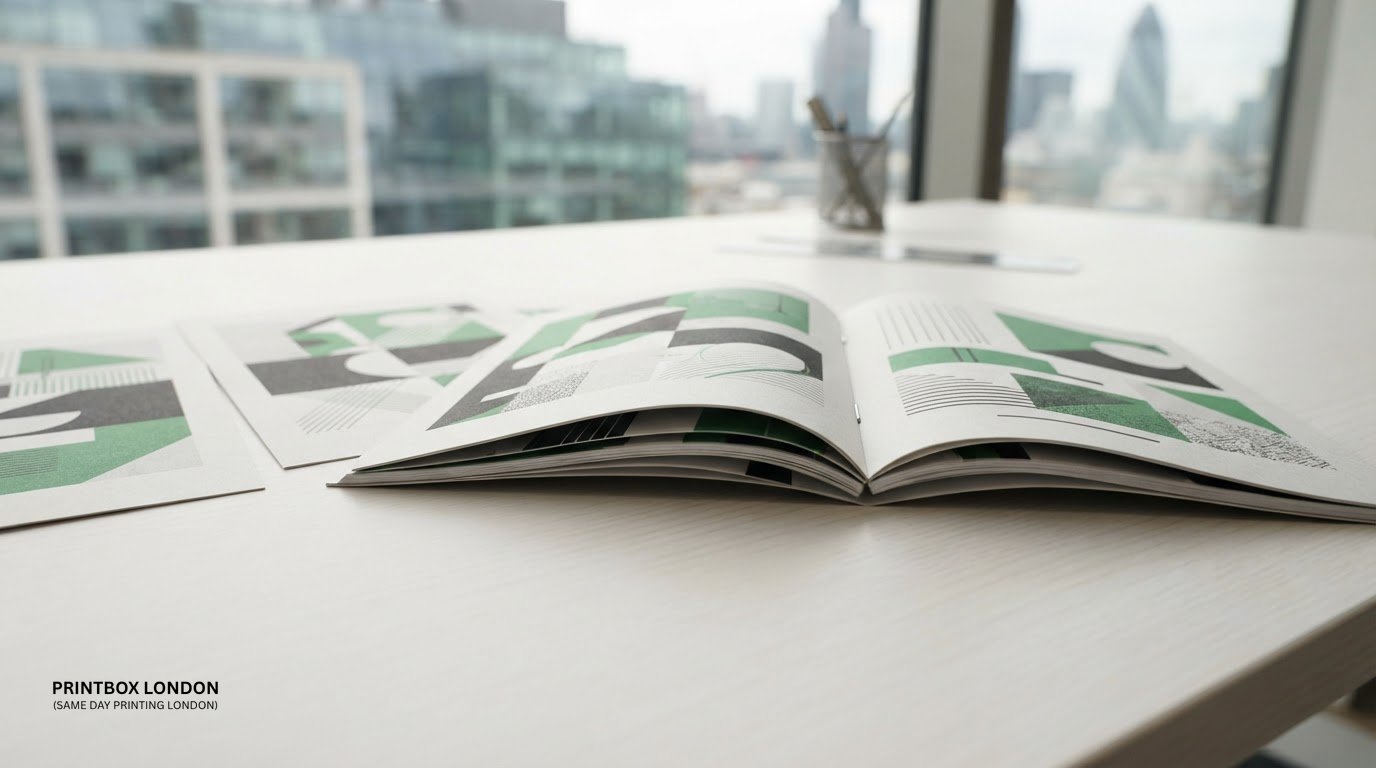
A booklet’s page count is determined by how its sheets fold, not by how many sheets it contains. This guide to booklet page count explained covers a common source of confusion: a page is one printed side, while a sheet is a physical piece of paper. In a typical saddle-stitched booklet, each folded sheet creates four pages, so the total usually needs to be divisible by four.
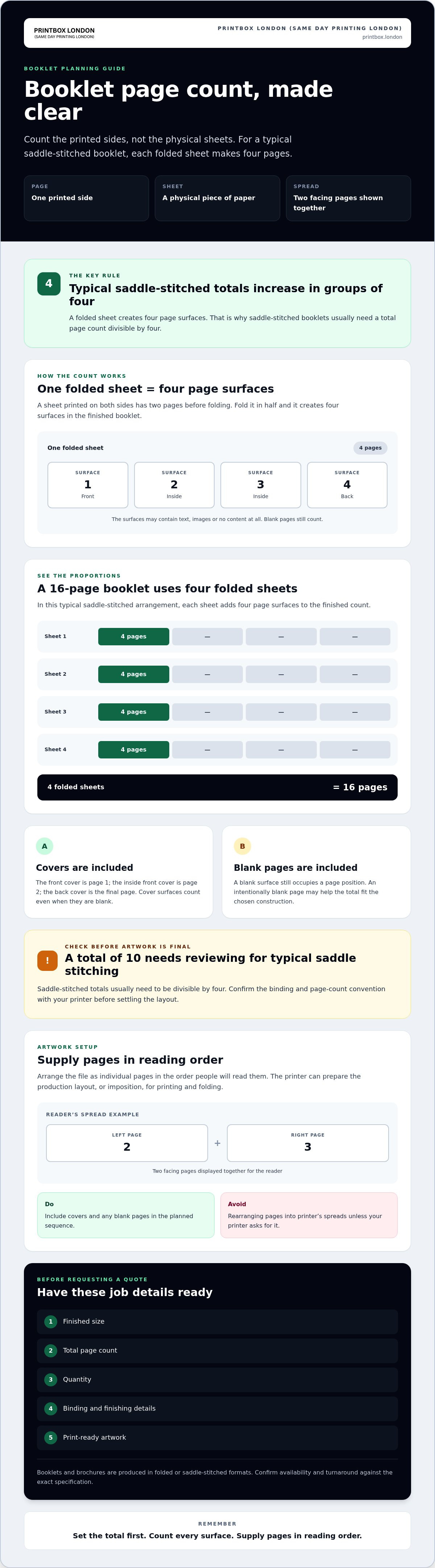
The cover is part of the count, and blank pages count too. The front cover is page 1, the inside front cover is page 2, and the back cover is the final page. A 16-page booklet, for example, is typically made from four folded sheets, not 16 separate sheets.
Set the total before sending your file to avoid last-minute layout changes. You’ll learn how pages, sheets and reader’s spreads differ, why saddle-stitched booklets usually need four-page increments, and how to account for blank pages. We’ll also explain why artwork should normally be supplied as single pages in reading order, rather than arranged into printer’s spreads. This gives you a practical starting point for preparing a print-ready booklet and requesting a quote.
Key Takeaways
- Use booklet page count explained to plan around the finished format and binding, rather than estimating from the document’s length.
- Settle the total page count before finalising artwork so the layout fits the chosen booklet construction.
- Keep artwork in reading order and let the printer prepare the production layout.
- Before requesting a quote, gather the finished size, page count, quantity, finishing details and print-ready artwork.
- Printbox London (Same Day Printing London) produces booklets and brochures in folded or saddle-stitched formats. Confirm availability and turnaround against your exact specification.
Booklet page count explained: pages, sheets and spreads
Short answer: a booklet’s page count is the number of individual page sides, not the number of physical sheets. One sheet printed on both sides has two pages before folding. Fold it in half and it creates four page surfaces in the finished booklet. This distinction matters when planning a programme: the cover and any intentionally blank pages are included in the total. Confirm how the cover should be supplied when you discuss the job with your printer.
What counts as one booklet page?
A page is one side of a leaf, whether it contains text, an image or no content. A sheet is the physical piece of paper; a page is one of its surfaces. They are not interchangeable terms. For example, folding one sheet in half creates four page surfaces: the front, two inside surfaces and the back. If the inside back is blank, it still counts as a page.
Pages, sheets and spreads in a print file
A spread is two facing pages shown together, as they might appear when someone opens a programme. These are reader’s spreads: page 2 beside page 3, then page 4 beside page 5. Printer’s spreads arrange pages on a sheet so they appear in the right sequence after printing and folding. This production arrangement is called imposition.
For a print-ready file, supply single pages in the order people will read them, unless your printer asks for a different setup. Don’t rearrange pages into printer’s spreads yourself. Include the front cover, inside covers and back cover in the planned sequence, and add any blank pages deliberately. This makes the intended total clear and helps prevent a cover or blank page from being missed during setup.
Before sending a programme to print, confirm the finished size, binding and page-count convention with your printer. A folded or saddle-stitched format affects how pages are grouped, so the production setup must suit the finished booklet. Printbox London (Same Day Printing London) produces booklets and brochures in folded or saddle-stitched formats. When asking for guidance, share the finished size, total pages, quantity, finishing details and artwork.
Why saddle-stitched booklet page counts are usually multiples of four
Saddle stitching joins folded sheets along the centre fold, usually with staples. Each folded sheet creates four page sides, so the finished booklet’s total typically increases in groups of four. Totals such as 8, 12 and 16 pages suit this format, while a total such as 10 needs to be reviewed before the artwork is finalised.
This rule follows the booklet’s construction, not its subject matter. A programme with fewer pages of content may still need an intentionally blank page to reach a workable total. The blank is part of the page count, not an extra sheet outside it.
How folded sheets create the page total
Think of each folded sheet as a four-page unit. One sheet provides four page sides; adding another brings the total to eight, and another brings it to twelve. A 16-page booklet uses four folded sheets in this typical arrangement. The sheets are nested together and secured along the fold, so their positions in the printed layout must produce the correct reading sequence after folding.
The printer’s imposition and the job specification determine the production layout. Use these totals as a planning guide, then confirm the finished size and binding before preparing the final file. The multiple-of-four rule applies to typical saddle-stitched booklets, not automatically to every binding method or print setup.
Do covers count towards a saddle-stitched booklet’s pages?
Generally, yes. Include the cover in the booklet’s total, and remember that it has an outside front, inside front, inside back and outside back surface. Some of these surfaces may be blank, but they still occupy page positions in the finished booklet.
For example, the front and back covers are included in a 12-page programme. The inside cover surfaces also sit within that total, whether printed or blank. Confirm with the printer how the cover should be treated in the supplied file and which total-page convention they need. This avoids a mismatch between the page count you give them and the artwork you send.
Before signing off your programme, check that the total suits the intended saddle-stitched format and that every cover surface is accounted for. If you’re planning a booklet, booklet and brochure printing details can help you prepare the job information to discuss with Printbox London (Same Day Printing London).
How binding and booklet purpose affect the page-count decision
The right page total depends on what the booklet needs to contain and how it will be made. A folded or saddle-stitched booklet is planned around folded sheets, so its page total typically needs to fit four-page groups. Other binding options, including wire or comb binding, have different production considerations. Don’t assume a total that works for one format will work unchanged for another.
Does every booklet need a page count divisible by four?
No. The four-page increment is typical for saddle-stitched construction, where folded sheets are secured along the fold. Other binding methods may allow different page-count arrangements, but the workable total depends on the exact format and printer setup. If your document is already complete, check whether it suits the chosen format before adding or removing pages. Even a small change can affect the layout and finished booklet.
For folded and saddle-stitched booklet jobs, confirm the proposed page total with the printer before locking the artwork. Printbox London (Same Day Printing London) produces booklets and brochures in folded or saddle-stitched formats. Turnaround depends on the job specification.
Choosing a page total for the booklet’s purpose
Start with the information readers need, then organise it into sections before settling on a total. A programme might need space for a welcome, running order and participant details. A brochure may group information by service or topic, while a report may need clear breaks between sections. An order of service can follow the sequence of the event. These are content-planning prompts, not fixed page-count rules.
Make room for the elements that help people use the booklet. Depending on its purpose, that could include:
- A title or opening page.
- Contents or section headings, if they help readers navigate.
- Section breaks that keep related material together.
- Intentionally blank pages where the layout or binding requires them.
Once you have a draft structure, check the total against the intended binding and finished size. Confirm the page count and cover treatment with the printer before finalising the file. For format enquiries, see booklet and brochure printing from Printbox London (Same Day Printing London), and share the finished size, total pages, quantity and finishing requirements. This helps ensure the page plan reflects both the content and the production setup.
How to plan and check booklet pages before sending artwork
Confirm the job details before exporting your file. Set the finished size, binding, total page count, quantity and any finishing requirements. These choices affect how the artwork should be prepared, so settle them before completing the layout.
A practical page-count and layout check
Use this checklist before sending a programme or other booklet for printing:
- Count every page. Include the front and back covers, inside cover surfaces and any intentionally blank pages.
- Check the binding. For a typical saddle-stitched booklet, confirm that the total suits the usual four-page increment.
- Review reading order. The PDF should follow the sequence a reader would turn through the booklet. Don’t rearrange pages into printer’s spreads unless the printer requests that setup.
- Inspect the layout. Check page orientation, numbering and margins. Keep important text clear of the trim edge, and confirm any bleed or other file requirements for the specific job.
- Check the exported PDF. Review the file page by page for missing, duplicated or out-of-sequence pages, and make sure blank pages are intentional.
A correctly prepared PDF is generally suitable for print, but requirements can vary with the finished size, binding and production setup. If your artwork uses spreads, unusual page dimensions or a separate cover arrangement, ask the printer how to supply it before making final changes. Check the exported file itself rather than relying only on the design canvas.
What to confirm before requesting booklet printing
For a useful enquiry, provide the finished size, total page count, quantity and whether the pages are intended to be single- or double-sided. Specify a folded or saddle-stitched format and describe any required finishing. If you’re unsure whether the page total suits the chosen setup, share the page sequence and ask the printer to check the specification.
Turnaround depends on the job specification, so include the artwork and full requirements when asking about suitability and timing.
Getting a booklet printed in London: what to send next
Before finalising your programme artwork, settle the page count and binding. This booklet page count explained guide covers the planning basics; the next step is to share the exact job details so the print setup and availability can be checked.
Timing depends on factors including page count, quantity, stock and finishing. Same-day printing is available for selected quantities and specifications, so confirm the turnaround for your specific job before relying on a deadline.
Information to include in a booklet enquiry
Make your enquiry easy to assess by including the finished size, total page count, quantity and preferred format. Note any material or finish preferences, if known, and state your required deadline. Attach the final artwork if it’s ready, and say whether you’re asking about collection or delivery so the available arrangements can be confirmed.
Confirming artwork, availability and collection
Ask the team to check that your file suits the requested format and that production is available for the full specification. Confirm collection arrangements with the order. Printbox London (Same Day Printing London) has a physical shop at 52 West Green Road, South Tottenham, London N15 5NR. Wait for confirmation that your order is ready before travelling to collect it, and don’t assume an unconfirmed turnaround or collection time.
Get your booklet ready for print
Plan the page total around the binding, not just the amount of content. A page is one side, not a whole sheet, and a typical saddle-stitched booklet uses a total divisible by four. Covers and intentionally blank pages count too.
Before finalising your artwork, confirm the finished size, binding, total pages and page order. Check the exported PDF, then share the quantity and any finishing requirements. This booklet page count explained guide gives you a practical starting point, but the production setup should be confirmed for your specific job.
Printbox London (Same Day Printing London) produces booklets, brochures and order-of-service items in folded or saddle-stitched formats. Production timing is confirmed against the specification, including page count, quantity, stock and finishing. Same-day printing is available for selected quantities and specifications.
Printbox London (Same Day Printing London) serves customers across Greater London, including Central London, North London, East London and South London, as well as West London, Haringey, Hackney, Islington, Camden, Enfield, Barnet, Westminster, Newham, Redbridge and Waltham Forest. The Tottenham shop is the physical collection location; confirm arrangements for your order.
With the page plan and artwork ready, contact the team with your full specification to check suitability and availability.
Frequently Asked Questions
Why does a saddle-stitched booklet need a page count divisible by four?
A typical saddle-stitched booklet needs a total page count divisible by four because each sheet is folded to make four page sides. Add another folded sheet and the total increases by four. This includes the cover surfaces. For example, a 12-page booklet uses three folded sheets in a typical setup. Confirm the final count and file arrangement with your printer before exporting the artwork.
Do booklet page counts include the cover?
Yes, the cover generally forms part of the total page count. Its outside front, inside front, inside back and outside back each take up a page surface, even if one or more are blank. For a programme, count the cover pages alongside the internal content rather than treating the cover as an extra sheet. Confirm the printer’s preferred cover setup when you discuss the finished specification.
Can a booklet have a page count that is not a multiple of four?
Yes, depending on the binding and production setup. The four-page increment is typical for saddle-stitched booklets, not a universal rule for every binding method. If your document’s total doesn’t suit the intended format, don’t change a finished layout without checking first. Ask the printer whether the chosen binding and specification can accommodate it, or whether the file needs an intentional blank page or another adjustment.
Is a page the same as a sheet in a printed booklet?
No. A page is one side of a leaf; a sheet is the physical piece of paper. A sheet printed on both sides has two pages before folding. In a typical folded booklet, that sheet creates four page surfaces. So a 16-page booklet isn’t 16 physical sheets. Knowing this difference helps you state the right total when planning a print-ready file or requesting a booklet quote.
How should I number pages in a booklet PDF?
Arrange the PDF as single pages in the order a reader will follow, from the front cover through to the back cover. Include blank pages in their correct positions. Don’t rearrange pages into printer’s spreads unless the printer specifically requests that setup; the production layout is handled separately. Check the exported PDF itself to confirm that pages aren’t missing, duplicated or out of order.
Should blank pages be included in a booklet page count?
Yes. An intentionally blank page still occupies a page position and must be included in the planned total. This matters especially for saddle-stitched booklets, where the total typically needs to fit four-page increments. Include the blank page in the PDF in the correct reading order, rather than leaving it out and expecting it to be added during production. Confirm the final count with your printer.
What information should I provide for a booklet printing enquiry in London?
Share the finished size, total page count, quantity, preferred folded or saddle-stitched format, any known finishing preferences, your required deadline and the final artwork. Printbox London (Same Day Printing London) serves customers across Greater London. Provide the full specification so the team can check the artwork, job suitability and turnaround. Same-day printing is available for selected quantities and specifications, subject to confirmation for your specific job.
Article by
Printbox London Team
The Printbox London (Same Day Printing London) team provides practical printing guidance based on real customer requirements and day-to-day print production. We serve customers across Greater London from our Tottenham print shop, with same-day printing available for many products depending on quantity, specification, artwork and production capacity.